
Co-designing a Communication Tool for international Students
How might we support the UW international students community by designing a communication tool?
UX Research & App Prototype
June 20 2023 – August 15 2023
Self-directed Project for HCDE Design for Passion
Project Lead: Lushan Wang
Team members: Akankshya Sahoo and Vaishnavi Gaikwad

This picture was photographed by my friend Xinlei Wang.
I was the model in the photo.
My Role
Project Lead
Proposed project topic
Directed project scope
Set teamwork agreements
Coordinated meeting times
Documented notes
Presented findings and
outcomes
User Research
Background research
Unstructured interviews
Co-design
UX Design
Information architecture
User flow
Storyboards
User journey map
Visual interface state transition
diagrams
Low-fidelity mobile app prototype
About the UW International Student Services
The UW International Student Services (ISS) is a place that provides information and assistance for international students to legally live and study in the U.S. Examples of services they provide include but not limited to in-person and online advising sessions, CPT/OPT application, tax information, travel signature requests. (https://iss.washington.edu/) All international students within UW would at some point interact with the ISS for visa documents or any other issues,
As an international student, I have personally experienced challenges and frustrations when interacting with the ISS system. For example, ISS only provide drop-in advising sessions that those were always crowded and the ISS website was hard to navigate.
Throughout this project, I was hoping to understand…
1) If other international students also feel the inconvenience that I felt
2) If they do feel it, how can I address some of the pain points and improve the system using design and design thinking?
Design for Passion
The Design for Passion program (DFP) is a yearly summer voluntary design program held by the HCDE Graduate Student Association. (https://www.hcde.washington.edu/GSA) In DFP 2023, both graduate and undergraduate students were to invited to attend the program.
With my passion for advocating for the international students, I proposed a self-directed project that aims to help UW international students by designing an app prototype for improving the ISS system. I recruited two members from the DFP participants who are also international students and passionate about designing for the international students.
Outcome
Our team developed a low-fidelity prototype of a communication tool that would improve the usability and efficiency of the ISS system.
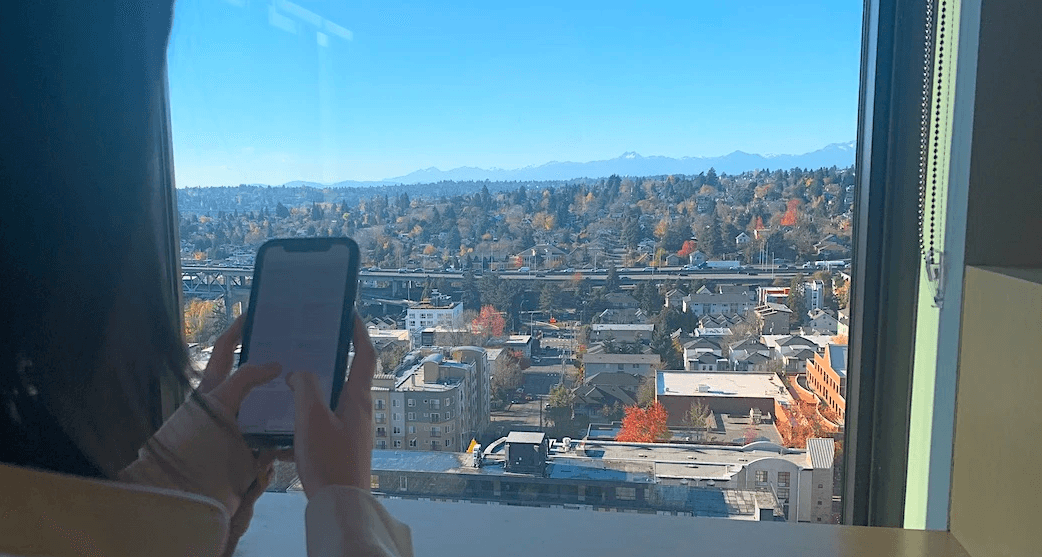

Using the app prototype that we developed.
This pictures were photographed by my friend Xinlei Wang.
I was the model in the photos.
Primary and Secondary Research
Secondary Research: Exploring the ISS UW Website
I asked each member on the team to individually explore the UW ISS website, and I had some interesting findings with the website.
On the landing page, it seemed to me that the picture was taking too much space so that I almost felt that there was no content below the picture. Users should be able to scroll down to read more contents, but the landing page didn't really have any clear indicators showing that the page is scrollable.
Another interesting finding that I had was that the Zoom link for online ISS advising sessions were only accessible through the "Events Calendar" instead of directly from the "Meet An Advisor" page. I wonder if users find it intuitive or not to go to the "Events" rather than "Meet An Advisor" page to find the link.
In addition, the ISS website seemed to provide less than enough detailed instructions for students to take actionable steps on their applications or requests.
In general, there were two problems with the UW ISS website:
Non-effective information display on the ISS homepage: Some of the buttons are redundant and hard to find.
The website has some good information, but the information architecture of the website is confusing and makes the website hard to navigate
The website sometimes doesn't have holistic enough information, which not only causes confusion for the students, but also potentially increases the workload of the ISS advising staffs.
Primary Research: Unstructured Interviews
The design team consisted of 3 international students, and we all had a decent amount of interactions with the ISS and we already know some pain points about the ISS. Since we wanted to reduce bias from our perspectives as designers as well as get to know how other international students perceive the usability and discoverability of the ISS system, I asked the team to conduct unstructured interviews to help us better understand the problem space.
In my interviews, I talked to some of my international-student friends, asked about their previous experience with using the ISS system, and synthesized the following user pain points:
Non-effective information display on the ISS homepage: Some of the buttons are redundant and hard to find.
Non-reasonable information architecture: Students need to visit the "Events" calendar instead of "Meet with an advisor" to find the drop-in advising link.
Confusing wording: "Virtual front desk" sounds like the place to go for the online advising sessions, but they are not. Virtual front desk can only answer very general questions and direct students to other resources instead of answering personalized immigration questions.
Hard navigation for ISS contact information: The "Contact ISS" tab leads users to a contact form instead of directly displaying ISS contact info such as email.
The ISS should be the place that provides guidance for filing tax, but the tax-filing info is hard to find and not comprehensive.
User persona
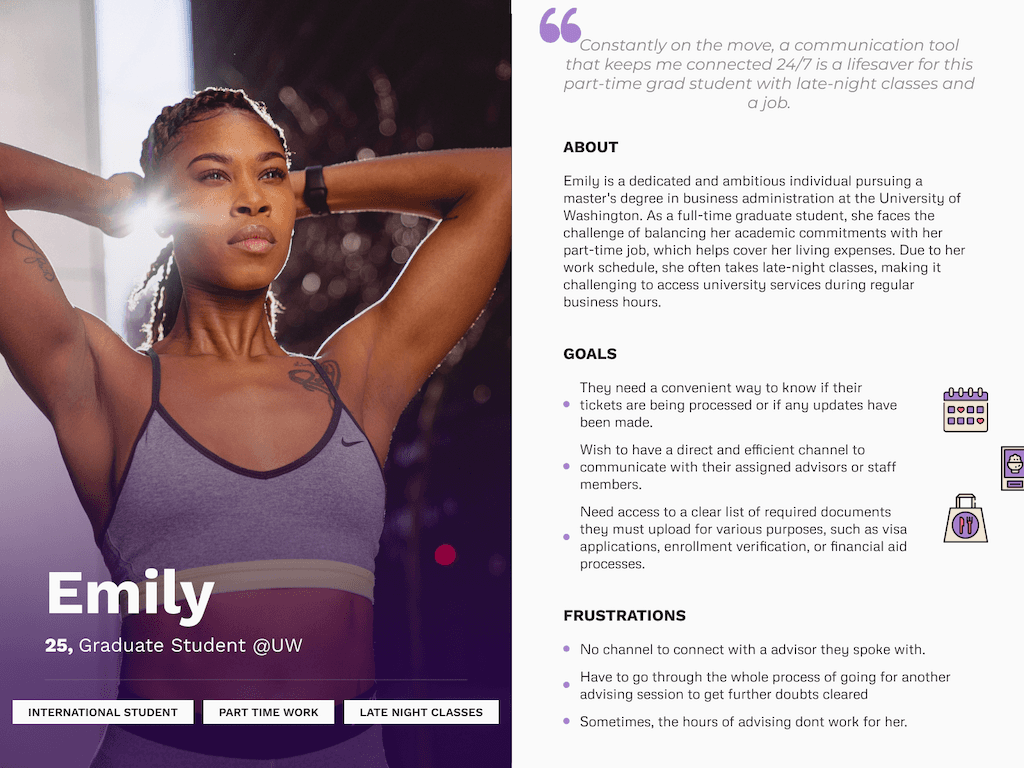
User Journey
User Journey Map
Now that we've got some understanding of the problem space, we wanted to ideate different stages of the user experience to address the identified problems.
After comparing the secondary and primary research results, I found some commonalities between my perception of the website's pain points and the true user needs. That's how I prioritize and select the following problems to address in our app:
.
Have the most commonly used ISS topics, such as travel signature, CPT/OPT, and tax information, displayed on the homepage of the app, so that it's not only easy to find for the students, but also could potentially reduced the amount of workload for the ISS advisors.
Allow international students to schedule ISS advising appointments. This is important because the current ISS system only allows students to drop in to their in-person or online advising sessions and those sessions are only available at certain times of a week. And there are a couple of problems with the drop-in only system: Students could not make it to those sessions if they have classes or other commitments during the fixed drop-in period unless they skip a class; Also, students would have to waste time waiting for a long line for the drop-in advising; What's more, there is a possibility that a student is not able to see the advisor because they are at the very end of the line/queue. All of the problems described could be addressed by enabling students to sign up for one on one appointments with an ISS advisor.
Enable students to send requests through the app. There are a lot of times where international students go to the advising sessions just to get some documents signed or approved. And in these cases, there isn't much value for students to commute to the ISS office because they could have simply send their requests to the advisors to get the signatures. Having this feature would save students a lot of times and potentially relieves the stress from waiting the crowded drop-in advising line.
Allow international students to interact with other international students. Based on my understanding, I don't think there is any official online forums for the UW international students to post and share experience with each other. The community forum in our app allows students to post questions and/or comments and interact with other international students.
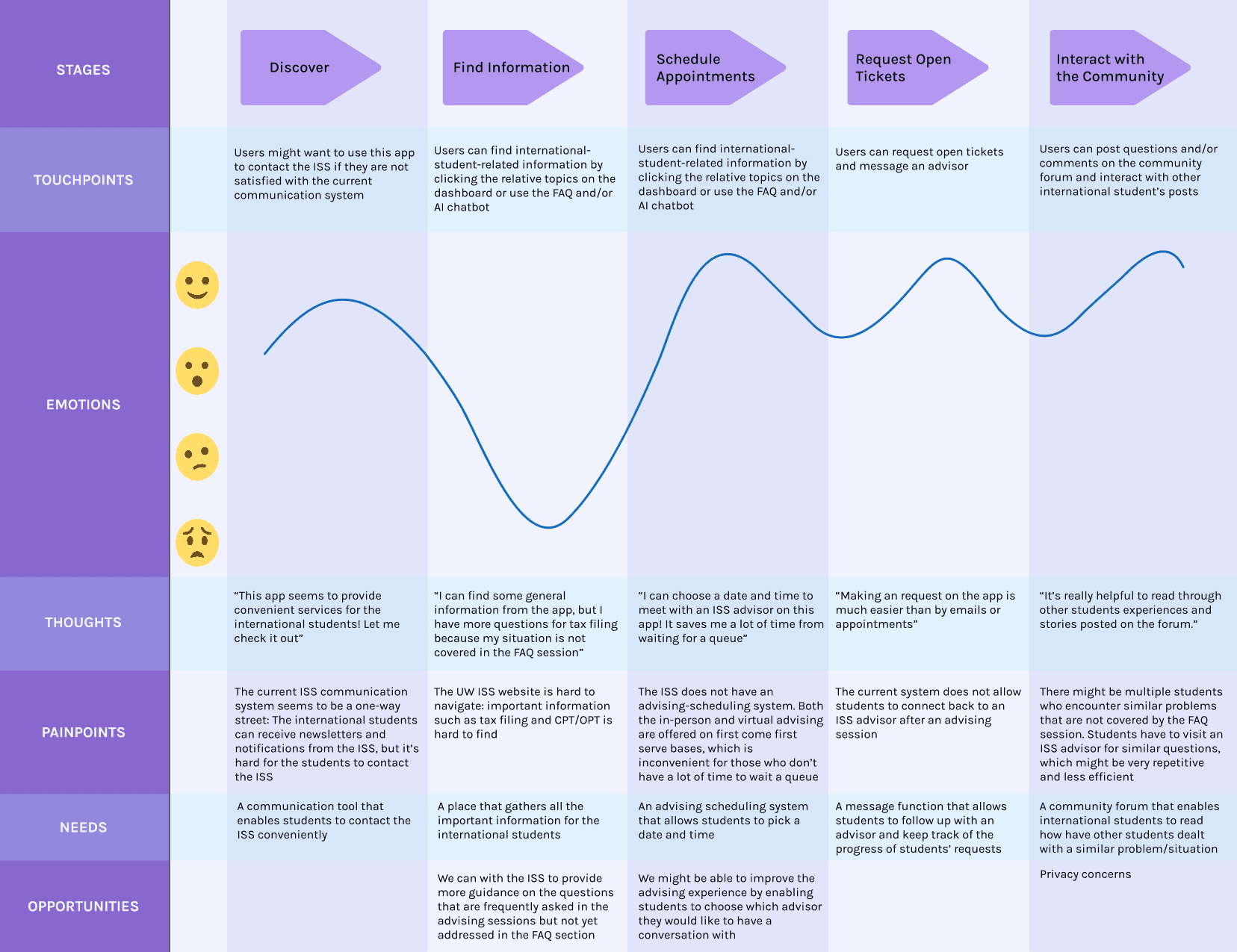
I created the user journey map below that represents the user experience throughout interacting with our app.
The user journey map that I created for representing the 5 stages of user experience: Discover, find information, schedule appointments, request open tickets, and interact with the community.
Storyboards
Based on the services and experiences that we wanted to provide in this app, I wanted to brainstorm some detailed functions and interactions around how might the app benefit the international students.
Below are 2 storyboards that depicts the following user cases:
An international student comes to the ISS office for in-person advising and found that they have to wait a really long line for an advising session. They don' t want to spend hours waiting for the queue, and they discover our app and found that they can schedule one-on-one appointments easily.
An international student has a quick question about requesting a travel signature. They don't want to go an advising session for a minor question, and with our app, they can simply post their question onto the community forum and ask for help. Other students who had experienced or addressed the same issue can reply on the forum to help each other out.
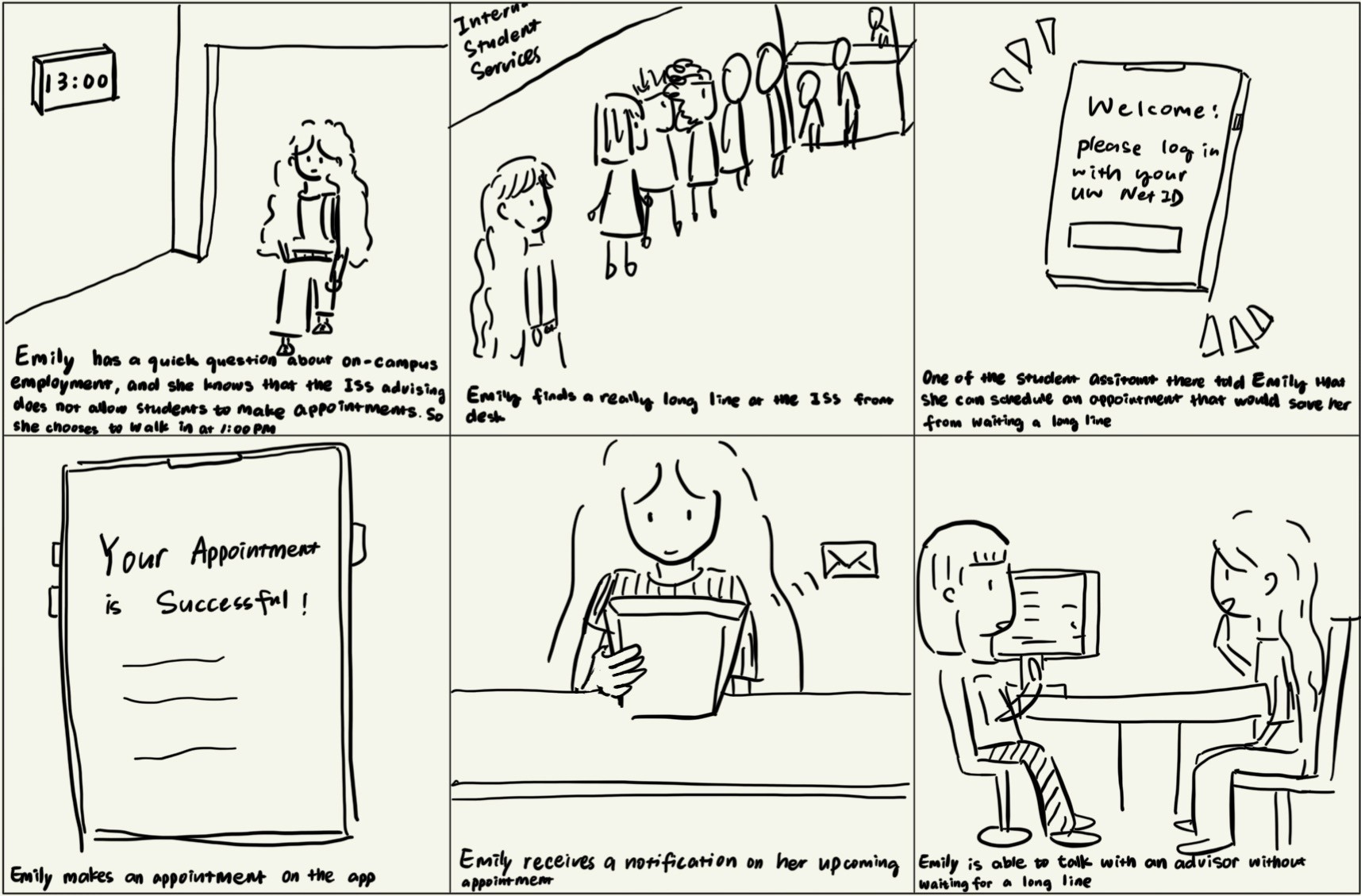
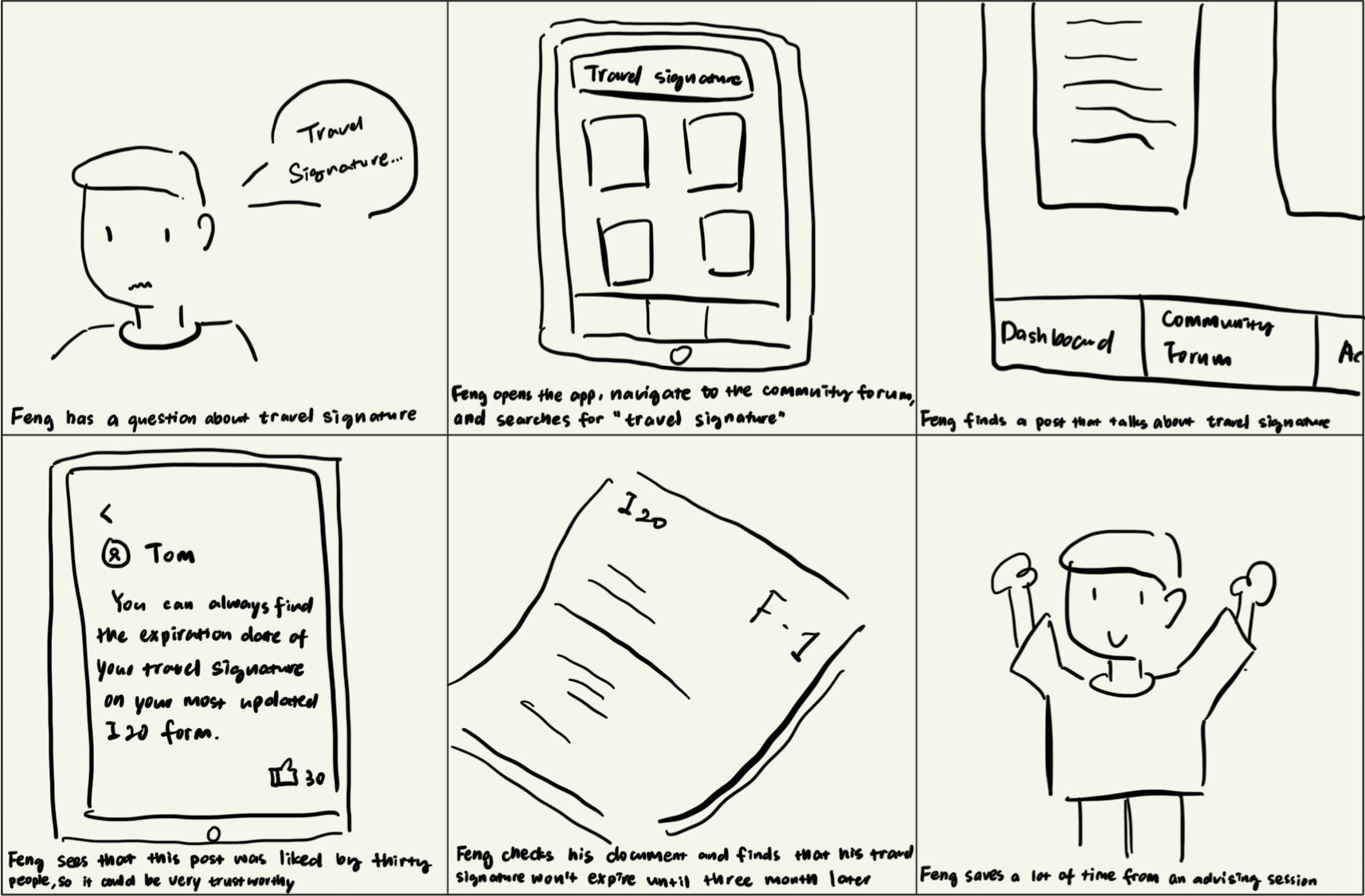
The two storyboards I created depicting two stages mapping to the user journey map: "Discover" and "Interact with the community forum"
Information Architecture
Co-Design Sessions:
What Features Should We Prioritize?
There were a lot of features that the design team worth implementing, but how could we know which features are the most important to our target audience?
I decided to use the co-design method to find out which features should we prioritize. Basically, I asked each member on the design team to hold co-design sessions, where international students were invited to articulate what functions within the scope of our project seemed most important to them. The artifact that we co-designed was the information architecture of this app.
We decided that the main page should include the scheduling advising function as well as quick links to some commonly asked immigration-related information. We wanted another tab for establishing the community forum because it's essential for international students to have a place to get together and help each other. The third tab would be the user profile page, where a student can easily link their account to their UW NetID as well as edit advising appointments.
Below is our information information architecture.
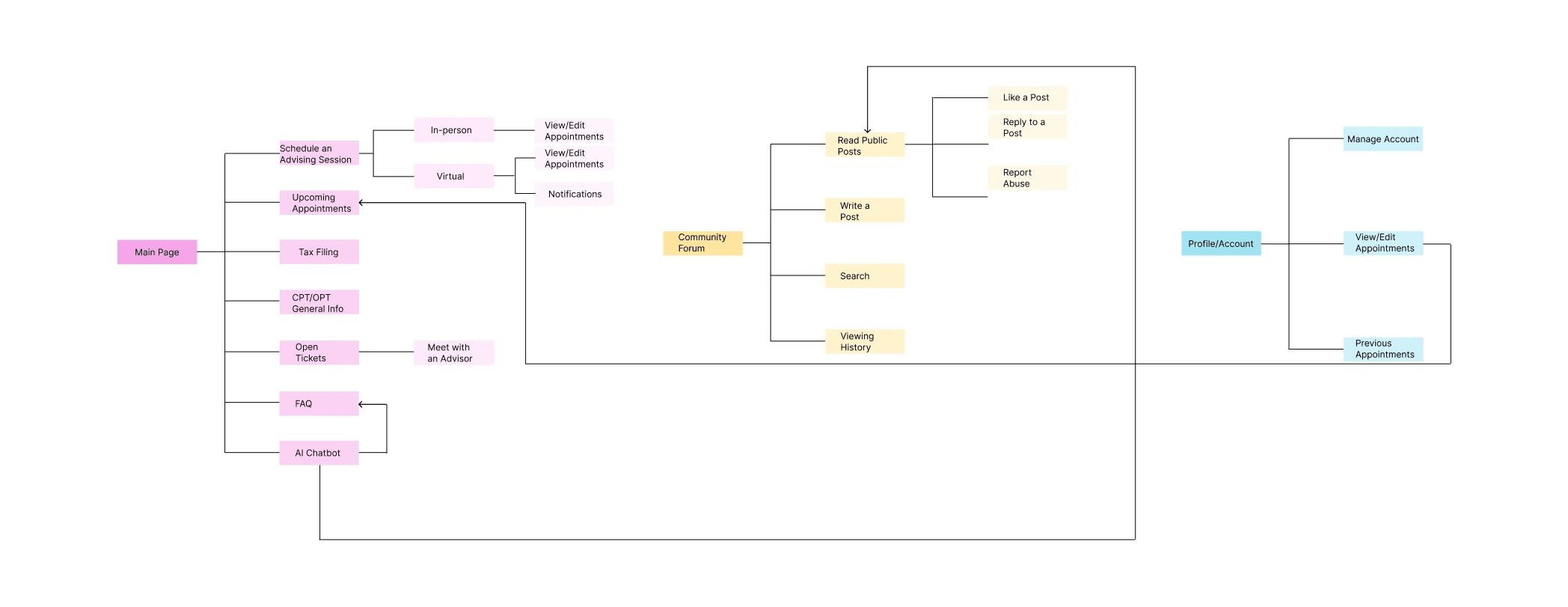
Information architecture that demonstrate our prioritization because it's important to allow international students: schedule ISS appointments, make quick requests, and have access to the community forum.
User Flow
4 User Flows We Wanted to Focus on
Now that we've got our information architecture, we would like to create step-by-step user flows showing how each one of the main features the app works.
The four main flows we wanted to focus on are:
Schedule an advising session
View/edit advising appointments
Post on community forum
Request an open ticket
The 4 user flows that we wanted to focus on building a lo-fidelity prototype
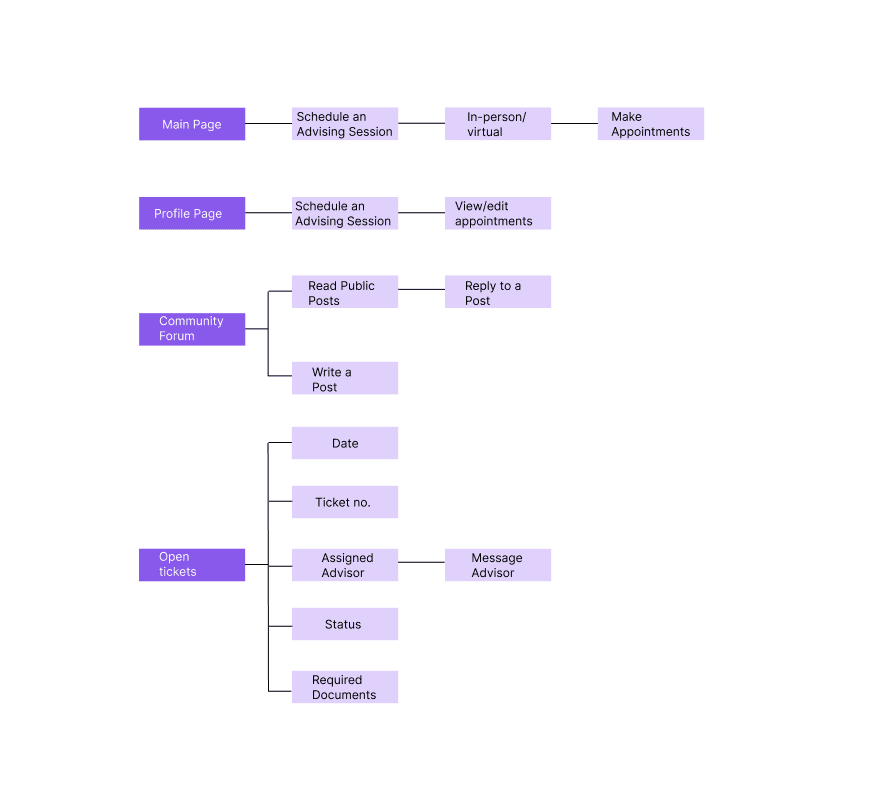
developing A low-fidelity prototype
Ideation
As a group, we ideated some screens that reflects our user flows.
Below are the sketches for scheduling an advising session.
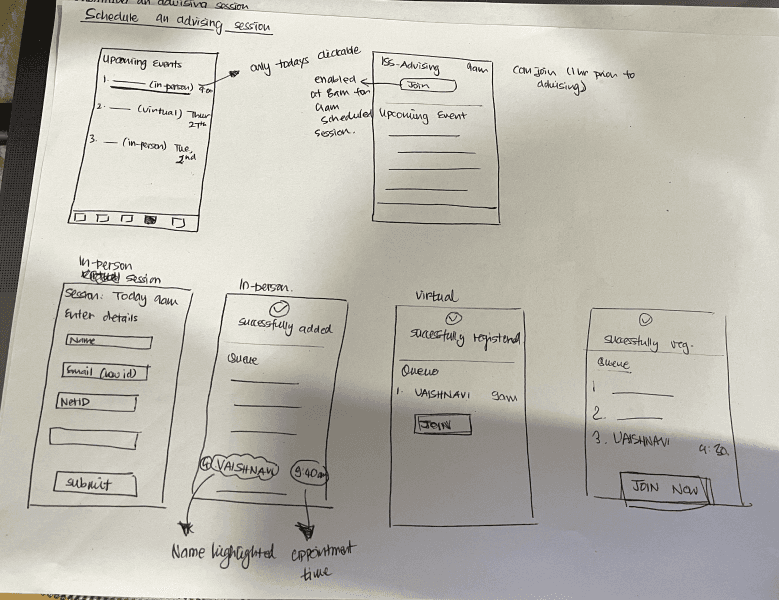
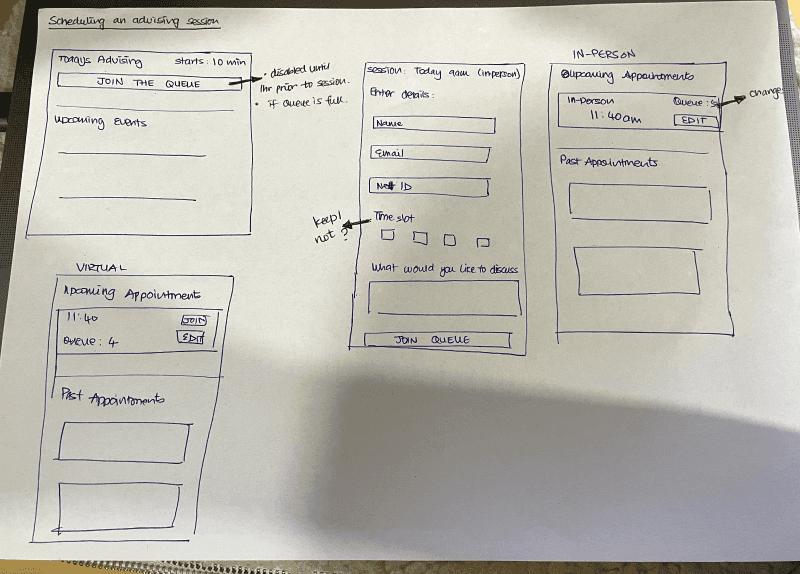
Ideation sketches for the low-fidelity prototype
Low-Fidelity Prototype
Based on the sketches and more discussions about the specifics about the flows and screens, the team created 20 screens of low-fidelity prototype for our app. There are four key interactions we would like to provide to the users:
Schedule an in-person appointment:
The app allows users to schedule either a virtual or in-person appointment with ISS advisors, choose an advising time on the calendar, write down requests, and confirm booking the session.
View/edit appointments:
Users are able to view or edit any appointments they've scheduled with an advisor.
Request open tickets:
International students can make ISS-related requests through requesting an open-ticket, which potentially saves their time for attending advising sessions.
Participate in community forum:
The app enables international students to connect with other students within the community to help each other and build communities.
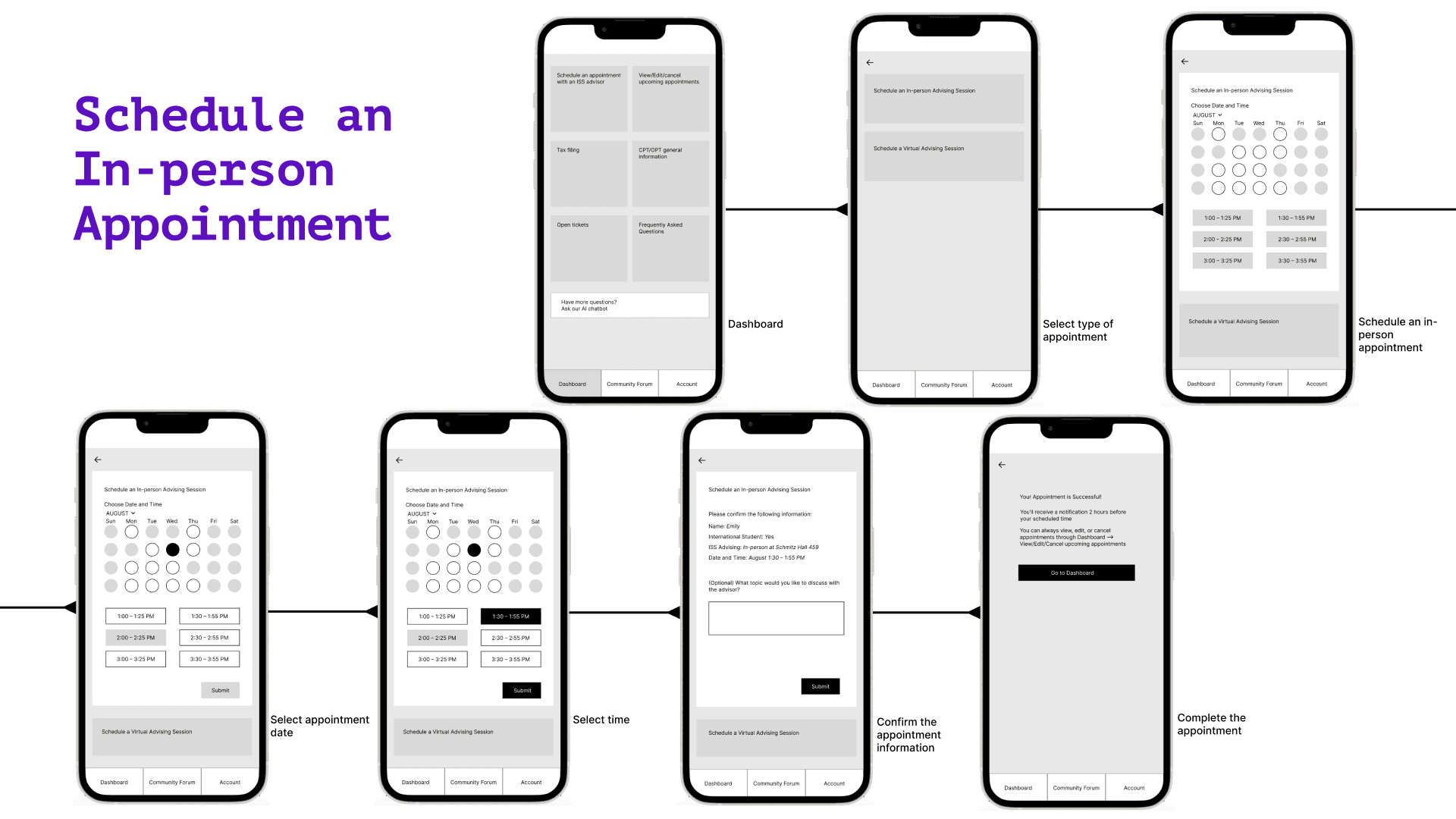
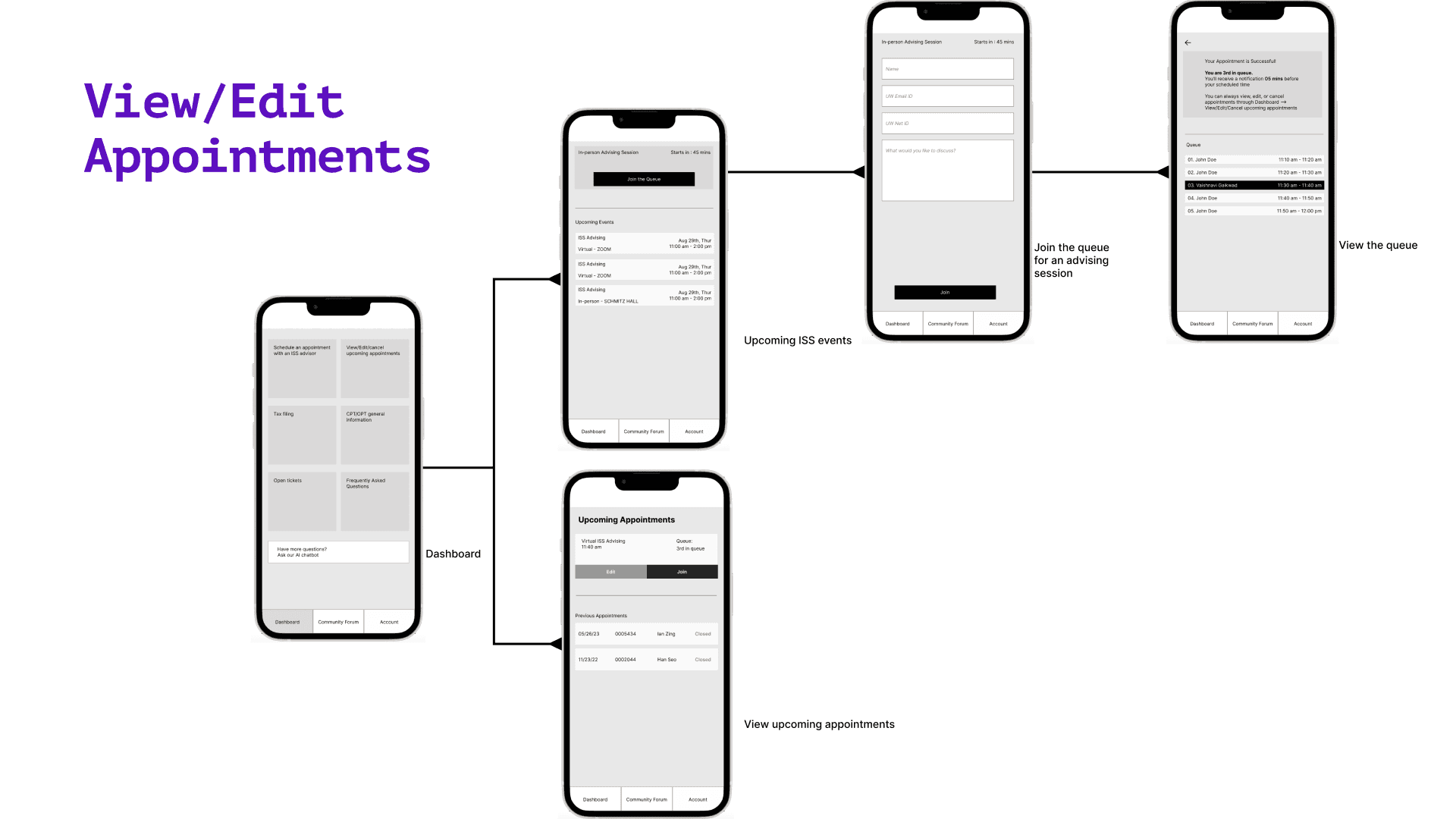
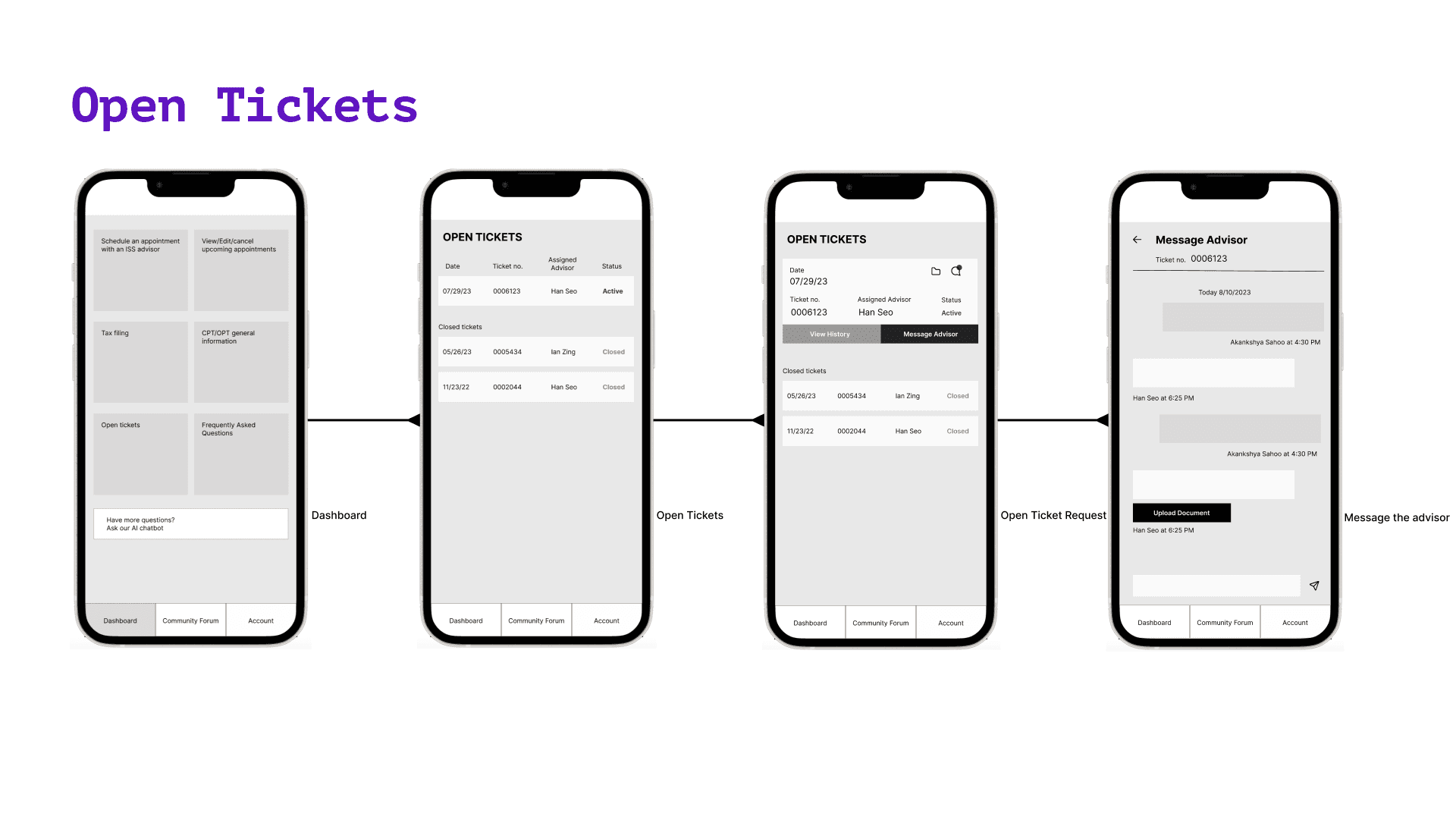
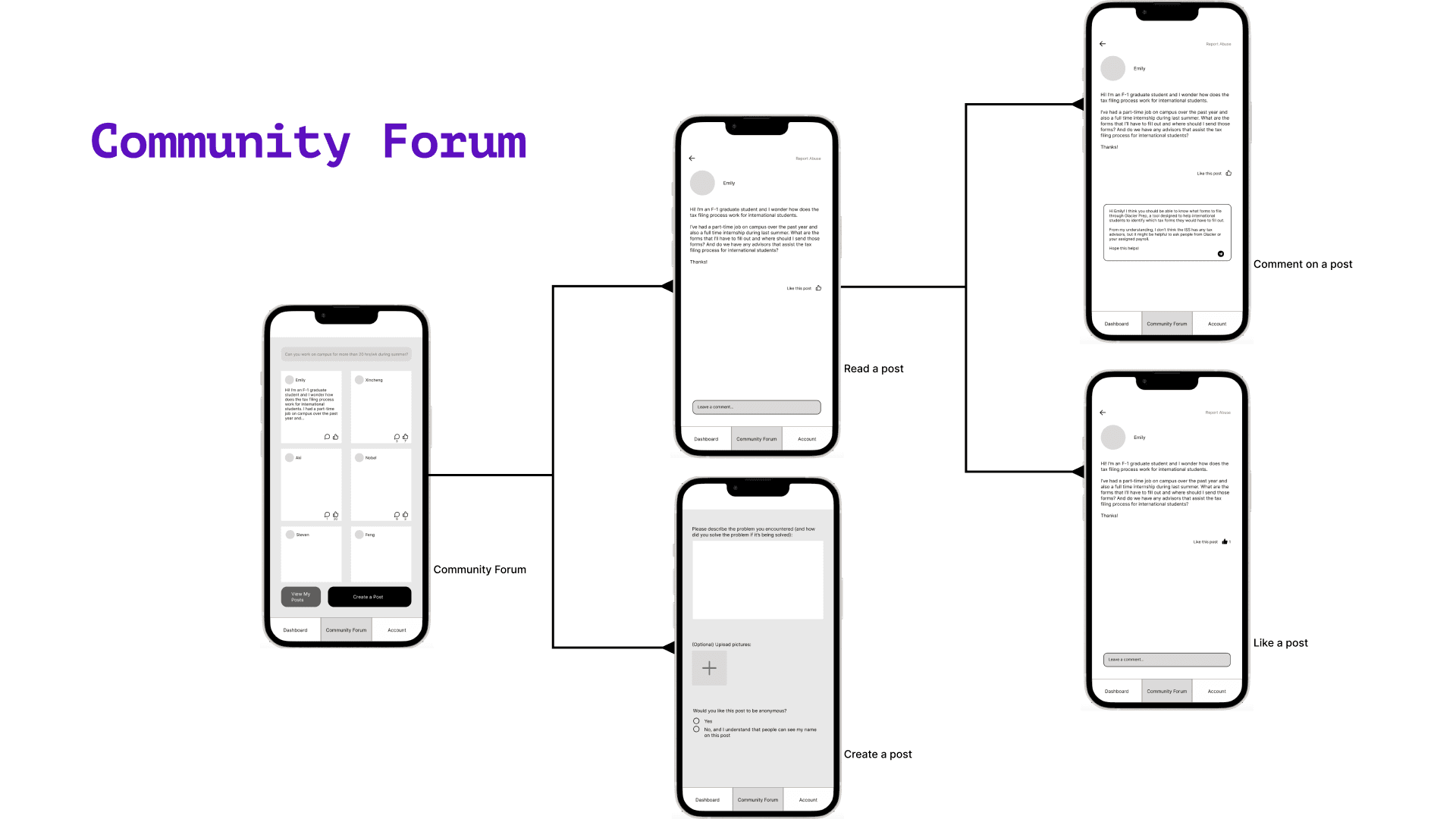
I created 2 of of the 4 user flows (including low-fidelity screens) for the app: 1) Schedule an in-person appointment and 2) community forum.
Presentation Video
I created slides and presented our solution to address the pain points with the UW ISS system to the HCDE Design for Passion program. The audiences were people who also attended the Design for Passion program.
Below is a video recording of my presentation.
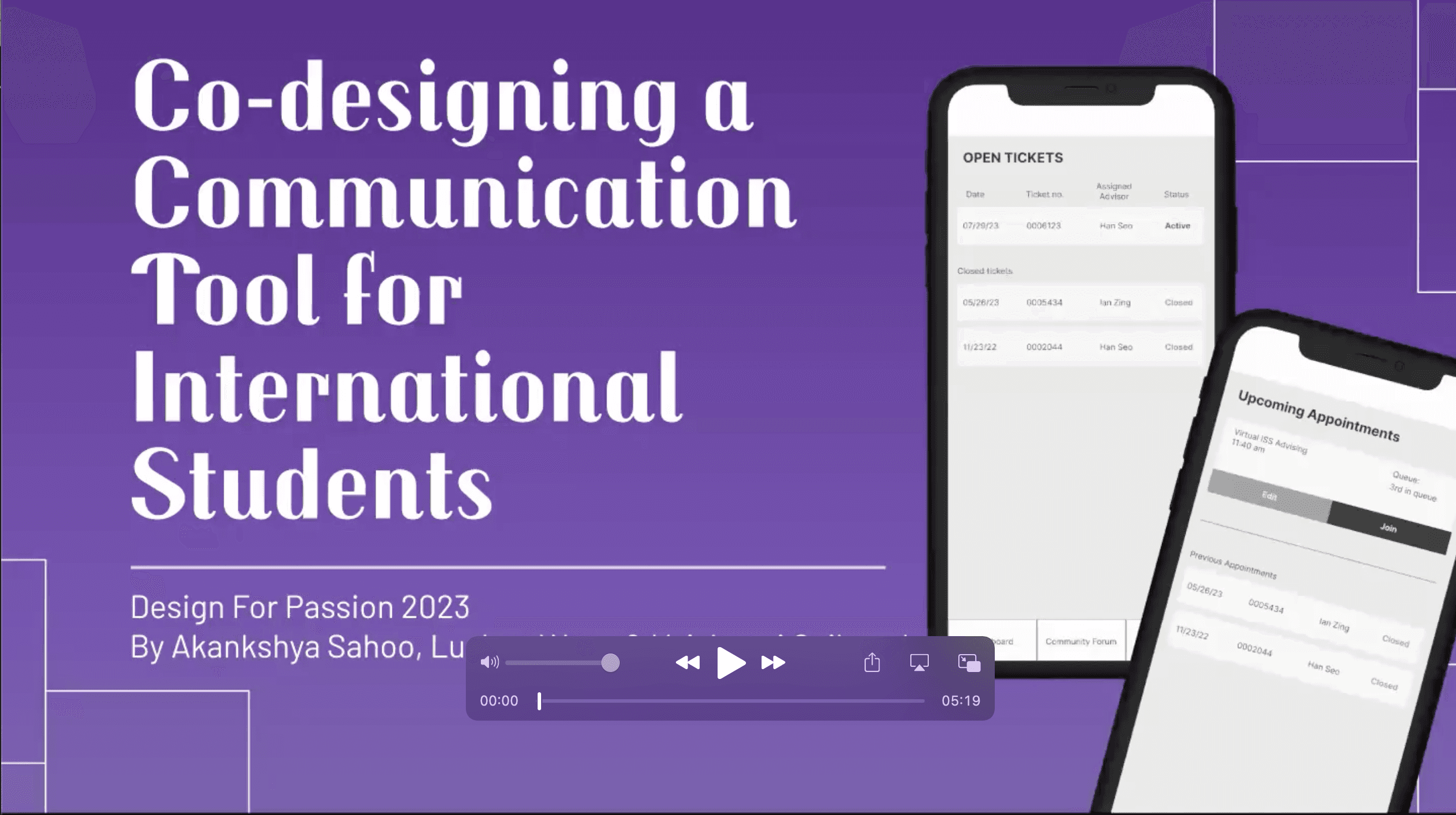
My presentation for the "co-designing a communication tool for international students" project
Note: Clicking on the video opens a new tab
Challenges that I Overcame
as The Project Lead
Challenge #1:
Hard to Find Meeting Times
As the project lead, I have encountered a lot of challenges when directing this project. Recall that this is a self-directed non-funded project, meaning that team members contributions were entirely voluntary and we don't get any compensation for the time we work on this project.
It's was challenging for me to find meeting times for the three of us, because we all had other commitments that we need to deal with such as work or research. Also since this project took place in summer, all three of the designers on the team had travel plans, which meant that the three of us were physically in different places and it made it even more difficult to coordinate meeting times due to the time differences.
The way I managed to find meeting times was that I sent out when2meet sheets 2 weeks in advance and ask us to input our availabilities. I then took a look at the sheet and decide a meeting time. Once a meeting time was decided, I sent out reminders on Slack group chat and through Google calendar to notify my team members.
Challenge #2:
Fully Online
Co-Working
Throughout the project, the team had to work online together because we were physically in different places during the summer. The challenge with working fully online was that it was hard to build trust and good co-working relationships with the team members. Additionally, instances like forgetting the meeting or bad internet connections happened and influenced our co-working quality and efficiency.
To address these problems as the design lead, I made sure to check in with team members at the beginning of the meeting to build trust and good co-working relationship with them. Also, I ensured people can get information even if they couldn't make it to the meeting by sending out post-meeting reminders that synthesized meeting contents as well as reminders for the next meeting time.
Challenge #3:
Limited Time Commitment
Since everyone of the Design for Passion program was volunteering their time to contribute to the project, the time commitment from each person was really limited to 3–5 hr/week depending on how busy they were.
Despite the fact that each member had limited time commitments to this self-directed project, we've still got reasonable and valuable outcomes. I think part of the reasons was because I respect my team member's time and wanted to get most out of each meeting, I prepared meeting materials such as agenda, outline, questions to discuss, and potential next steps in advance.
Reflection
Throughout this project, I brought the needs of an underrepresented group – international students – to light, by leading a design team of 3 people, investigating the interface of the UW International Student Services website, and co-designing and brainstorming features and information architecture of a communication app.
The team successfully identified the following pain points for the UW ISS website:
Lack of the feature that allows students to schedule ISS advising appointments
Difficult to navigate because of unclear information architecture
Insufficient information for certain services such as for CPT/OPT and tax filing
Lack of official forum for international students
I ultimately led and directed the team to create a low-fidelity prototype of our envisioned app, which potentially can help address the pain points above. As an international student, I feel proud about our accomplishment because designing this tool allows me to reveal the true need of international students and advocate for my community.
As the project lead, by writing and executing plans, arranging and hosting meetings, and assigning work to team members, I learned a lot of project management skills such as discussion facilitating, time management, public speaking, and conflict management. I hope to take these skills into my future collaboration opportunities to build connections with my colleagues and create high-quality teamwork outcomes.
Next Steps
Research on the Current ISS Advising System
How do ISS staffs feel about their current advising system?
What are the constraints on the ISS side?
Usability Testing
Does this app address the identified pain points?
How might we make this app more helpful and accessible?
Hi-fi Prototype
Iterate the design process based on more research and usability testing
Create a more refined prototype with a logo, pictures, and colors
© 2024 Lushan Wang Portfolio. All rights reserved.