
Roommatcher
How might we make it easier for the UW students to find compatible roommates?
UX Design
Jan 13 2023 – March 19 2023
HCDE 318 Class Project
Design Team: Amisha G., Lushan Wang, Naiyyra A. Aziz, Zane Isley

Person using Roommatcher.
This picture was photographed by my friend Pengfei Sheng, and I was the model in the picture.
My Role
UX Design
User journey map
Design requirements
Storyboards
Information architecture
Annotated wireframes
Visual interface state transition
diagrams
Usability Testing
User Research
Interview & Persona
Competitive and inclusive design analysis
Prototyping
Low-fidelity mobile app
prototype
Interface design sketches
High-fidelity mockup
Context
College students are often finding roommates for of a lot of different reasons, such as having unsatisfied roommates, deciding to change housing preferences, experiencing financial difficulties.etc. For example, a student might need a new roommate immediately if they have a roommate who graduate from school early than expected and this student needs a new roommate to share the renting bill.
Thus, we envision to prototype a mobile app that helps UW students to quickly find potential roommates, connect with people outside of their social circle, and chat with people they are interested in becoming roommates.
Outcome
The team successfully created an interactive high-fidelity app prototype that connects users with a large pool of potential users, provides an easy way to read other users profile and message each other, and relieves the anxiety of the stressful roommate-finding process.
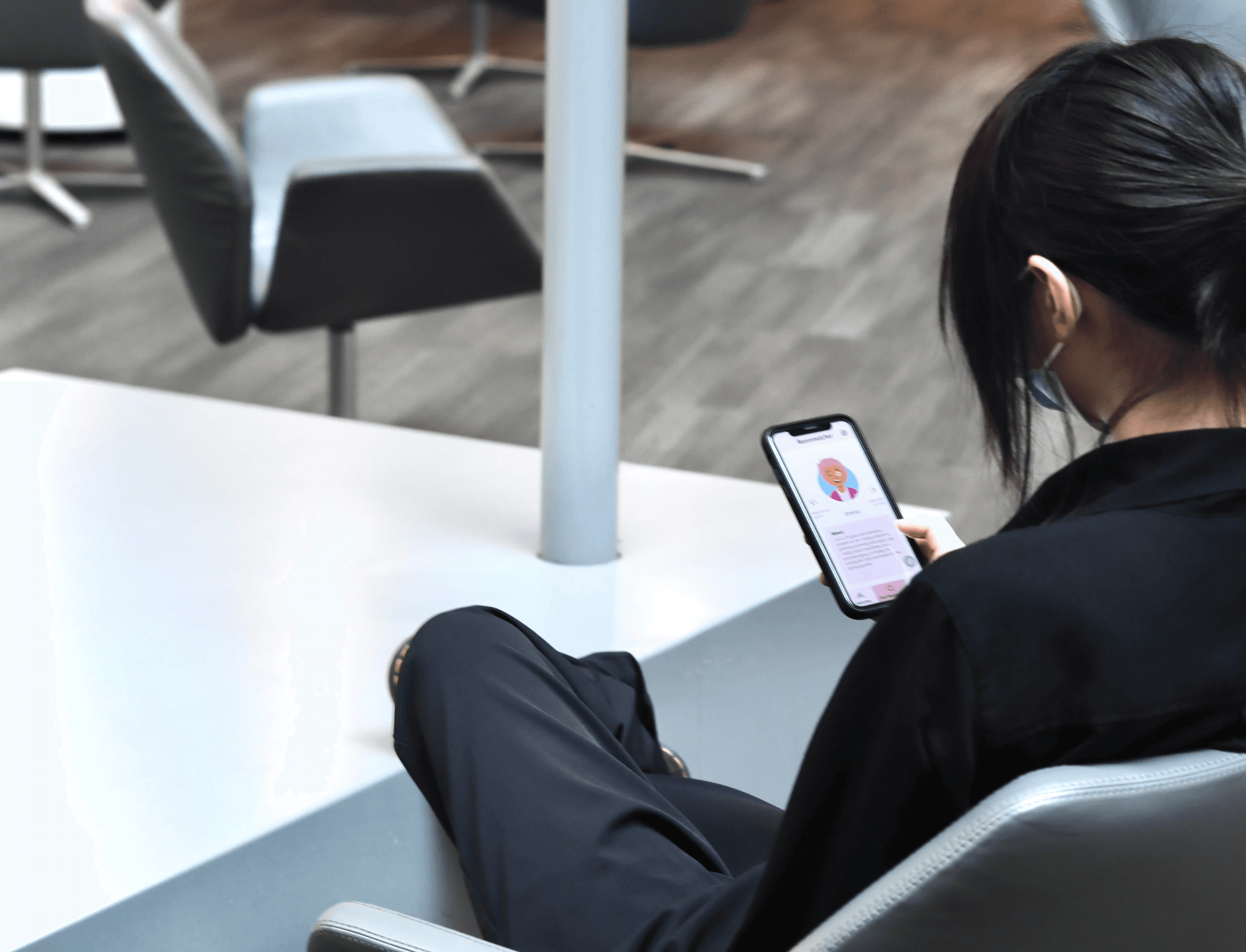
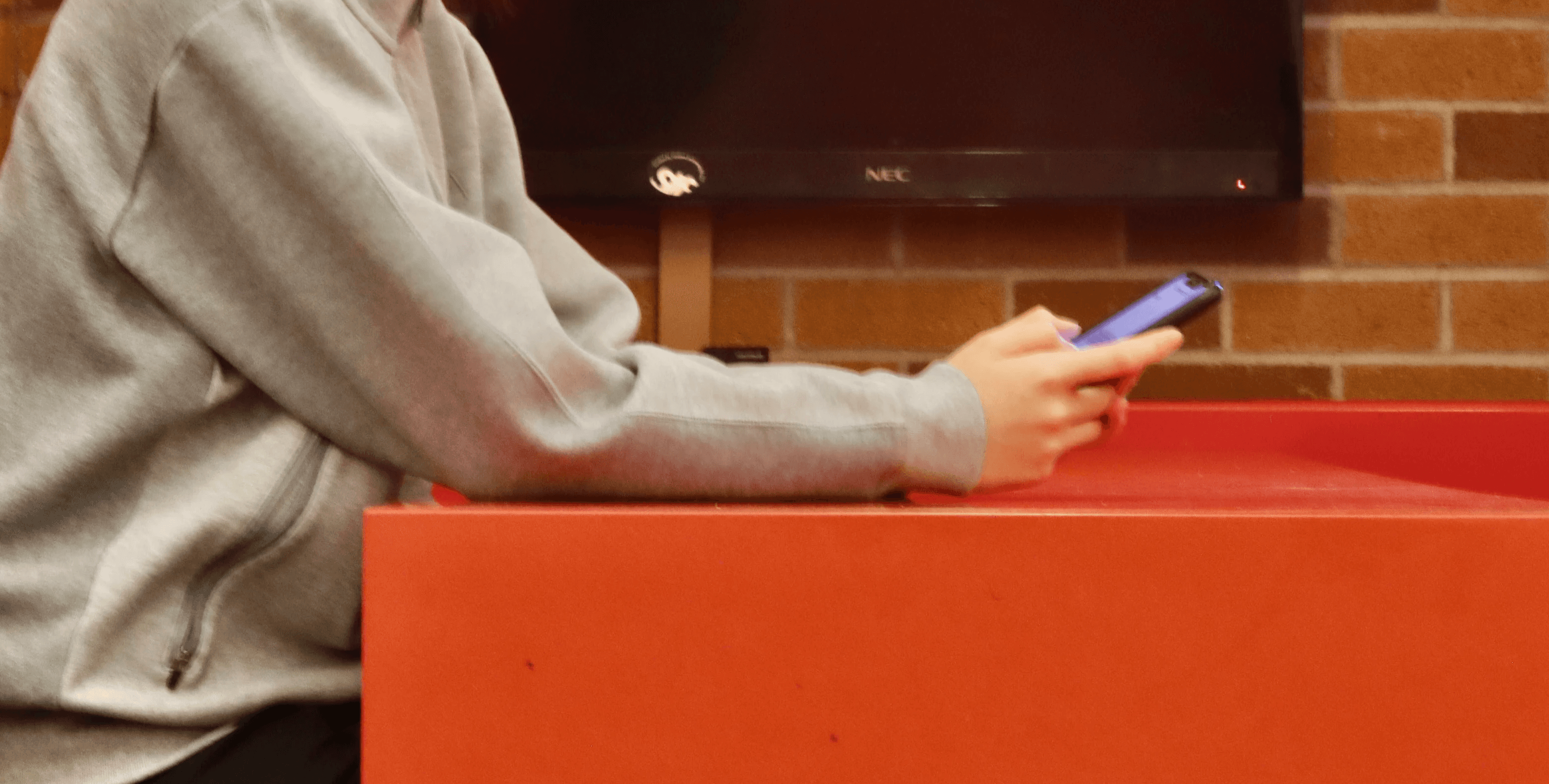
Roommatcher, a mobile app that helps UW students to find compatible roommates.
These pictures was photographed by my friend Pengfei Sheng, and I was the model in the pictures.
The Roommate-Finding Problem
Who Are the Users?
The target audiences of our product are the UW students. The challenge of getting to know the users arises from the fact that we are all UW students, and we might unconsciously project our needs and beliefs to every potential user. To reduce the number of reassumptions we made, each member in our team conducted a semi-structured interview with a potential user. We then synthesize the interviewee’s characteristics to generate polished personas.
I interviewed ZP and found the following needs and pain points:
1. The interviewee wanted to find a compatible roommate and evaluate their roommate before living with them.
2. The interviewee cared about roommate’s cleanliness and values communication.
3. The interviewee would feel more comfortable living with someone they knew rather than a stranger.
4. In terms of privacy concerns, the interviewee felt comfortable about inputting their general information in a roommate-finding app, but they also expressed concern towards inputting more private information.
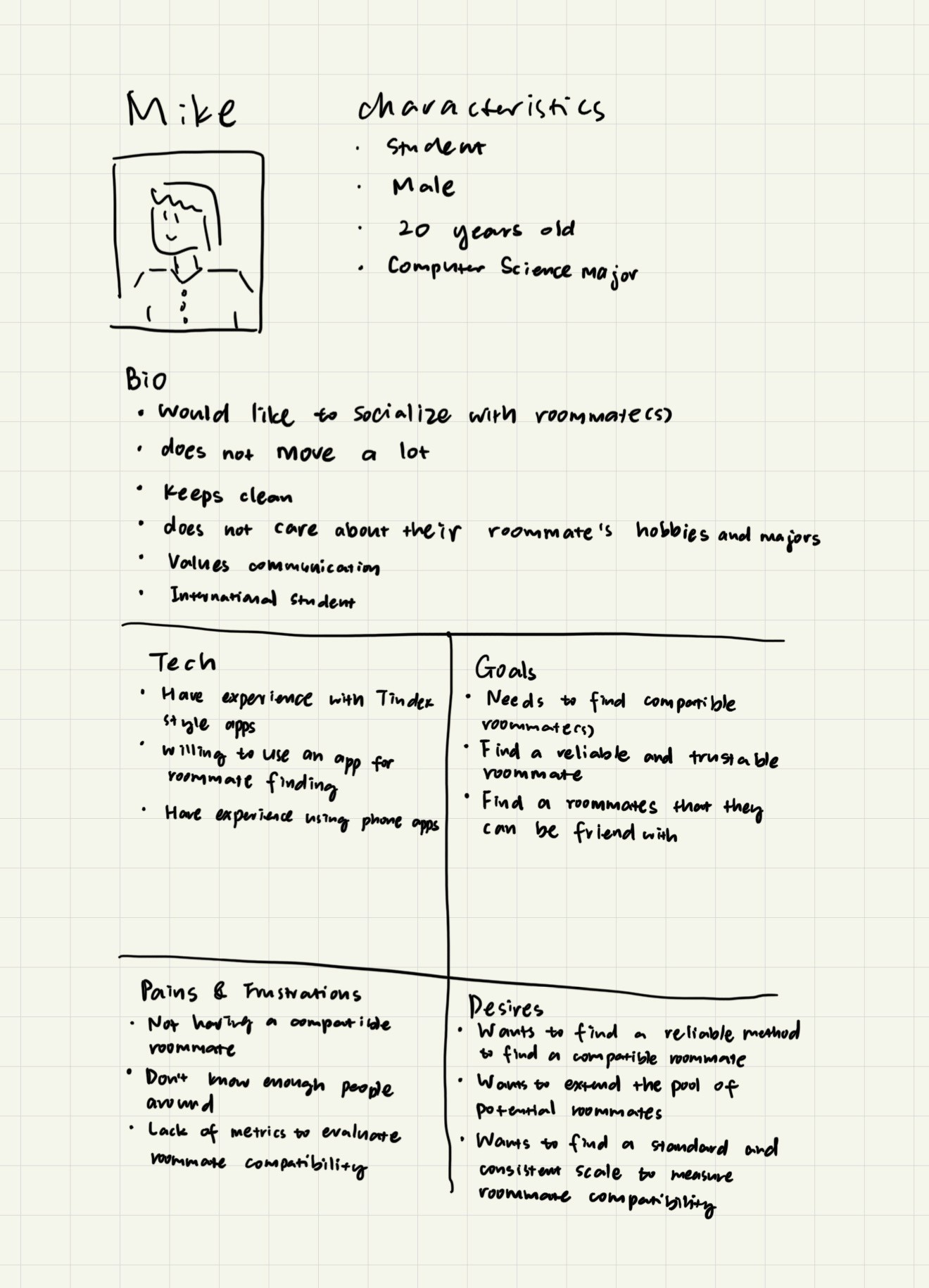
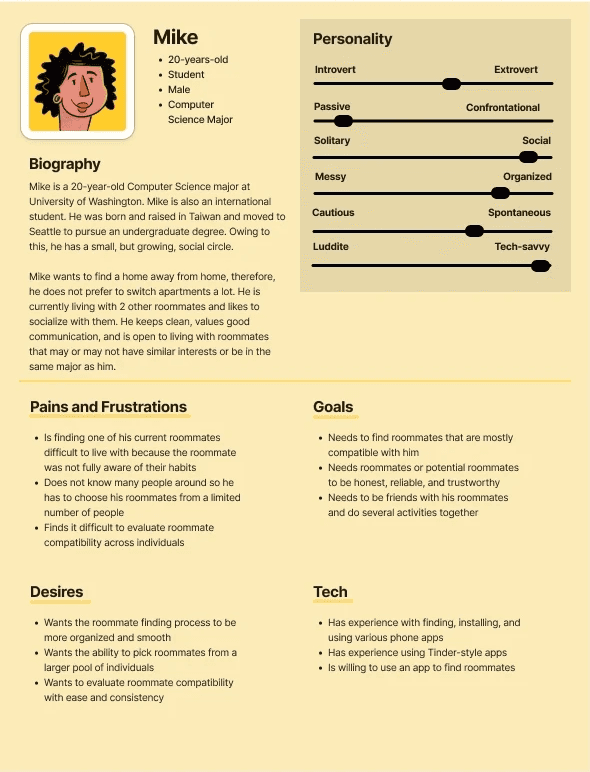
Amisha and I created one of personas, Mike.
Mike wants their roommate to be honest and reliable and consider them to be a potential friend to hang out with.
What Are Some Existing Products that Attempt to Solve a Similar Problem?
Competitive and Inclusive Design Analysis:
There are some existing websites and apps that aim to address the problem of people having difficulty finding compatible roommates. Since we wanted to understand what was successful and what didn’t work for the potentially competitive products, each one of the team members investigated one roommate-finding product to understand its functionality and room for improvement.
I found that Roomi (https://roomiapp.com/) was the roommate finding website that I checked out and two successful designs stood out to me. First, Roomi effectively achieved their goal of prompting a user to input information to user profiles right after they created an account. Second, Roomi successfully extends their potential users by providing both the roommate-finding and room-finding services.
As much as I found the website easy to navigate and get started with, there were two pain points that I encountered when interacting with Roomi. First, Roomi limits content access for users who have not completed the required fields in their user profile, which caused privacy concern for me because I don’t feel comfortable uploading my profile photos to a website that everyone can easily have access to. Second, I found the “Flag” function very confusing because what does it mean to “flag” someone was not clear to me until I read their documentations.
Bearing in mind the successes and flaws of the products that each one of us investigated, the team started ideating features we would like to include or avoid in Roommatcher.
User Journey
Storyboards
Since it's important to identify the potential user experience and frustrations, the team create a series of storyboards for envisioning different stages of user scenarios. Each member on the team was assigned to two user scenarios and individually created storyboards for each assigned scenario.
Below are the storyboards that I made for installing the app and finding the first roommate match. I envisioned that the user might want to find a new roommate because they don't get along with the current roommate anymore. They might hear about Roommatcher from their friend's word-of-mouth recommendation and get the app installed for quickly finding a roommate. During the onboarding process, all they need to do is to complete their profile for their personalities and preferences, and they are all set for receiving roommate recommendations.
My second storyboard is for a scenario where the user has already installed Roommatcher, but they felt frustration because they has not find a compatible roommate yet. Roommatcher suggests that they should input more information to their profile in order to get more precise and personalized recommendations, so the user types in more information. Finally, the user gets roommate recommendations that are more tailored to their preference and finds a satisfiable profile for a potential roommate.
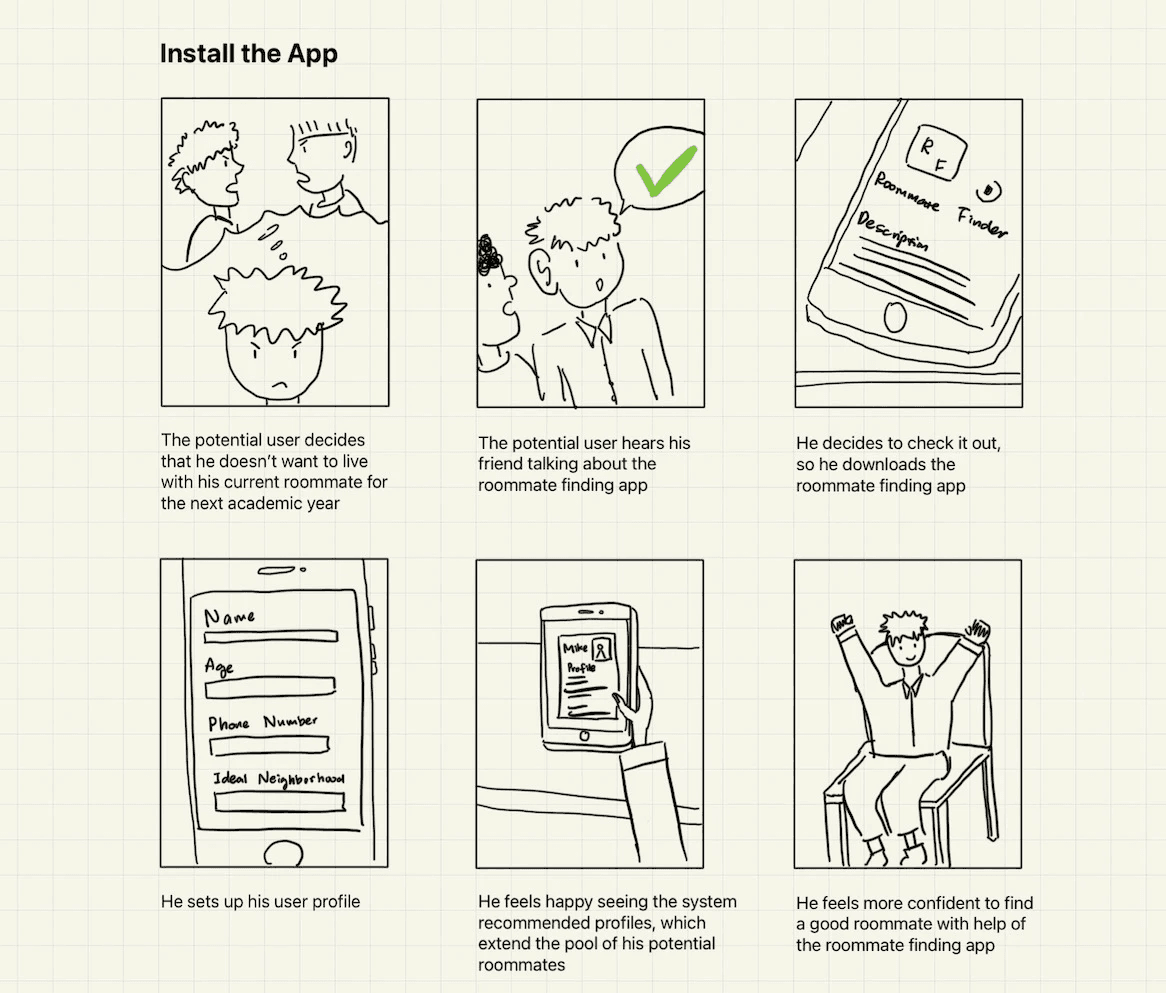
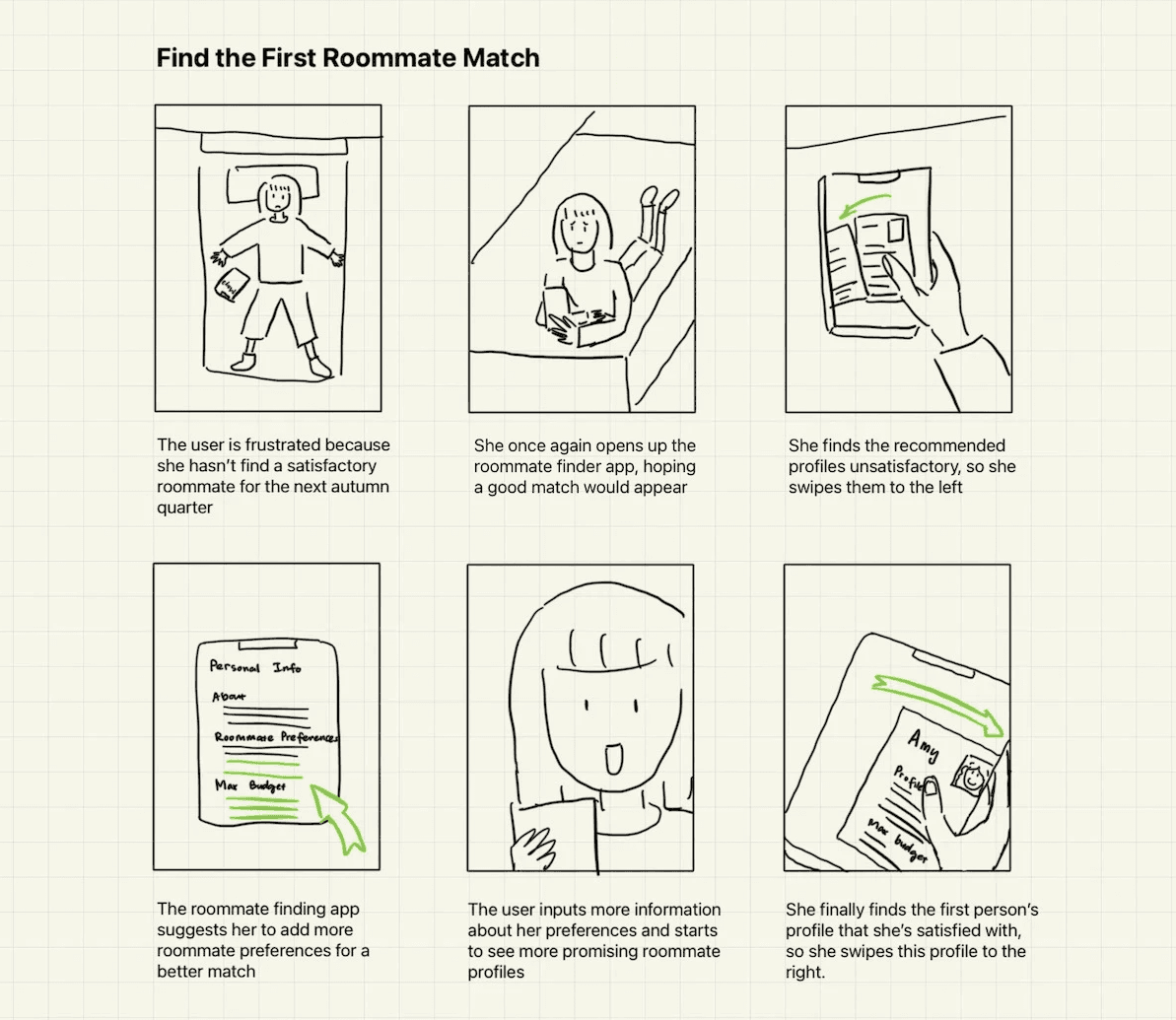
The two storyboards I created depicting two user scenarios: Installing Roommatcher and finding the first roommate match
User Journey Map
To create a better user experience, the team discussed use cases for Roommatcher, including brainstorming different user scenarios as well as analyzing user's emotions and reactions towards certain features. Our user journey map focused on understanding the anxiety, frustration, and satisfaction of the user experience as someone progress from installing the app to finding a compatible roommate.
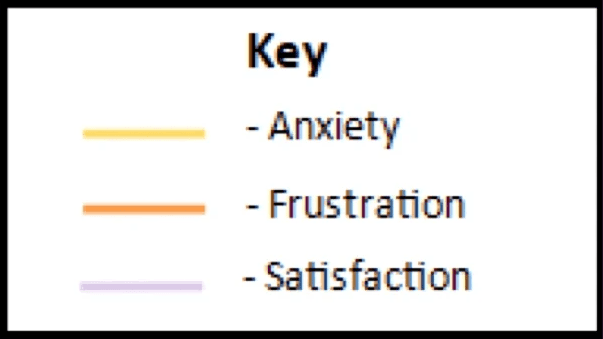
Key for anticipated user emotions
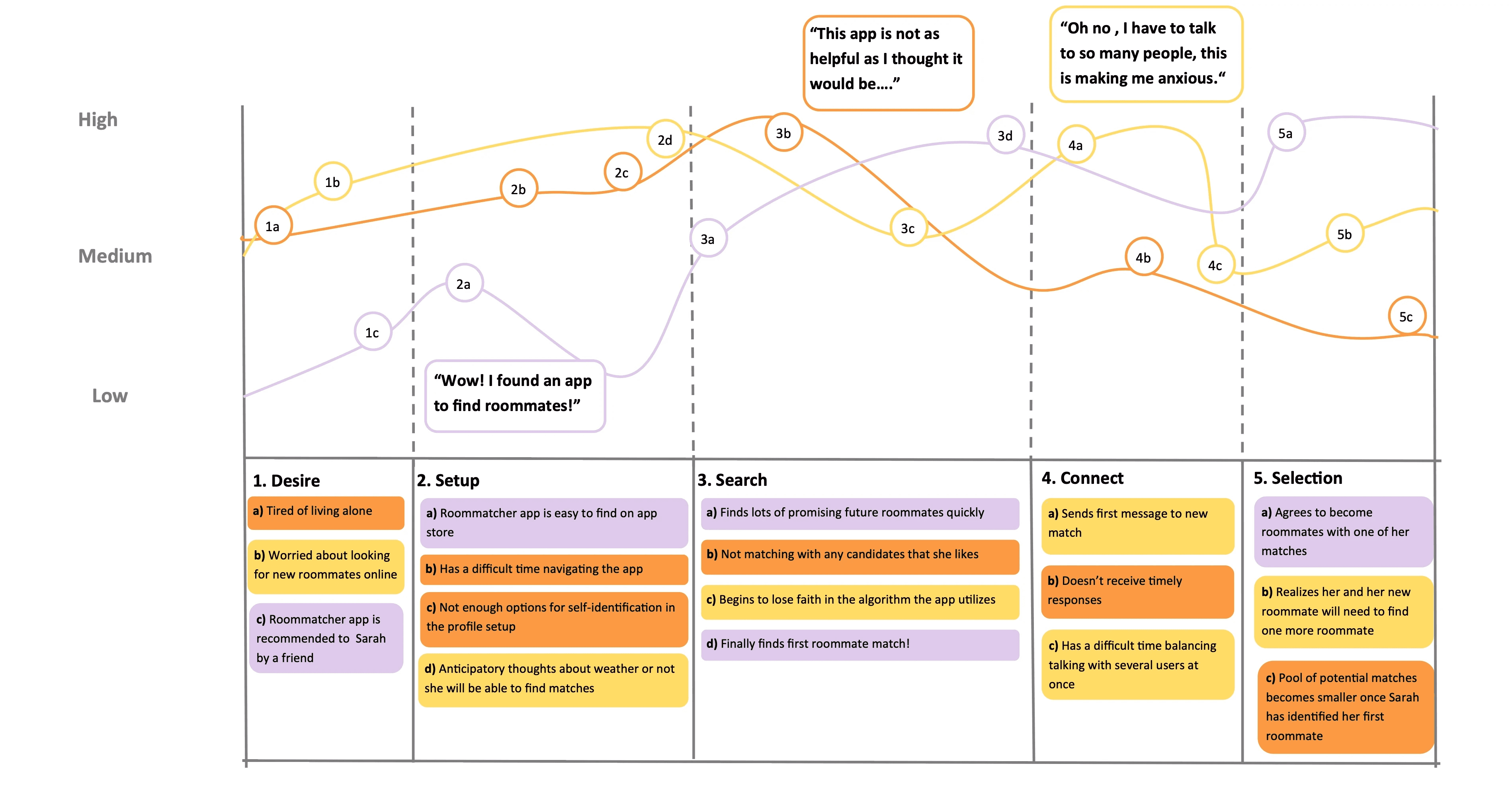
User journey map for 5 stages:
Desire: User wants to find a new roommate
Setup: User found one potential solution, installing Roommatcher, to help them find compatible roommates. The app prompts user to self-report personalities and expectations for roommates
Search: After user creates their profile, the built-in algorithm automatically starts to recommend roommate profiles. User can swipe left on the profile to ignore the recommended person, or they can swipe right to match with them, meaning to indicate that the user wants to get to know more about the recommended person and might consider becoming roommates with them.
Connect: The user is able to connect and chat with their matches.
Selection: Mutual selected matches become "roommates".
Challenges For the Design Team
Challenge #1:
What Algorithm Should We Use to Make Roommate Recommendations?
The design team sat down and talked about our individual perception on the implementation details of Roommatcher, and we had very different mental models of how should the app make recommendations to users.
Amisha said that we should be quantifying different traits/preferences of every users. For example, we might allow users to self-report how introverted or extroverted they are on a scale of 1 to 10, and then the app would use those numbers to match people with their needs and preferences. The user would see the potential roommates who has the highest percent of matching rate as the very first recommendation, which should be an accurate and efficient way to matching users.
However, I saw some problems with the kind of recommendation Amisha proposed, so brought it on to the table and shared my thoughts with the team. First, I think that the self-reported data is not an accurate way of evaluating users because someone's perception and interpretations about the 1 to 10 scale could be very different from another. Thus, the data users provide would not be consistent and is likely to be biased. Second, if we are showing users how many percent their profile matches with another user, it almost feels like that the system attempts to evaluate users. And it would be unpleasant and less friendly for someone to see a low matching percentage with another person. Third, if a user knows that the first couple of profiles they see are their best matches, how can we even motivate this user to keep exploring different possibilities?
Therefore, I suggested that it makes sense for Roommatcher to recommend potential roommates based on user profiles, but only at the very beginning of the user journey. As the user interact more and more with the roommate finding process – swiping left or right on others' profiles – the app's algorithm should learn what a user like and dislike from their swiping behavior to refine the future recommendations. In this way, the app could make recommendations well tailored to user's needs.
Our team decided to adopt my idea of using an algorithm that is able to learn user behaviors to make roommate recommendations.
Challenge #2:
Which Functions Are the Most Important to Users?
There is no doubt that roommate finding is the most important feature we waned to design and should go into one of the main tabs in Roommatcher. However, we had a hard time deciding which other function(s) are most important to users so that the function(s) should also sit at the main tabs.
I said that we should have 3 main tabs because they are the most important functions for the app:
Find roommates
Matches (that allows users to see the profile of and chat with a list of their matches)
Profile
While my teammates have different opinion about the tabs Roommatcher should incorporate. They said that the main tabs should be:
Find roommates
Matches
Chat
My teammates explained to me the rationale for making "Chat" a separate tab, it was because a user might have a lot of matches, but they don't necessarily want to chat one-on-one with everyone. So having a separate "Chat" function allows the user to quickly find the people they have messaged.
After listening to their explanation, I thought it would make sense to give the chat function its own tab because the messaging function is more important for users than a user profile page, so the team ended up using "Find roommates", "Matches", and "Chat" as the main tabs.
Challenge #3:
How Can We Enable Users to "Unmatch" with A Current Match?
Another concern that I brought up was: What if the user accidentally matched with someone they don't intend to? There should be a feature that allows users to undo matching at any time.
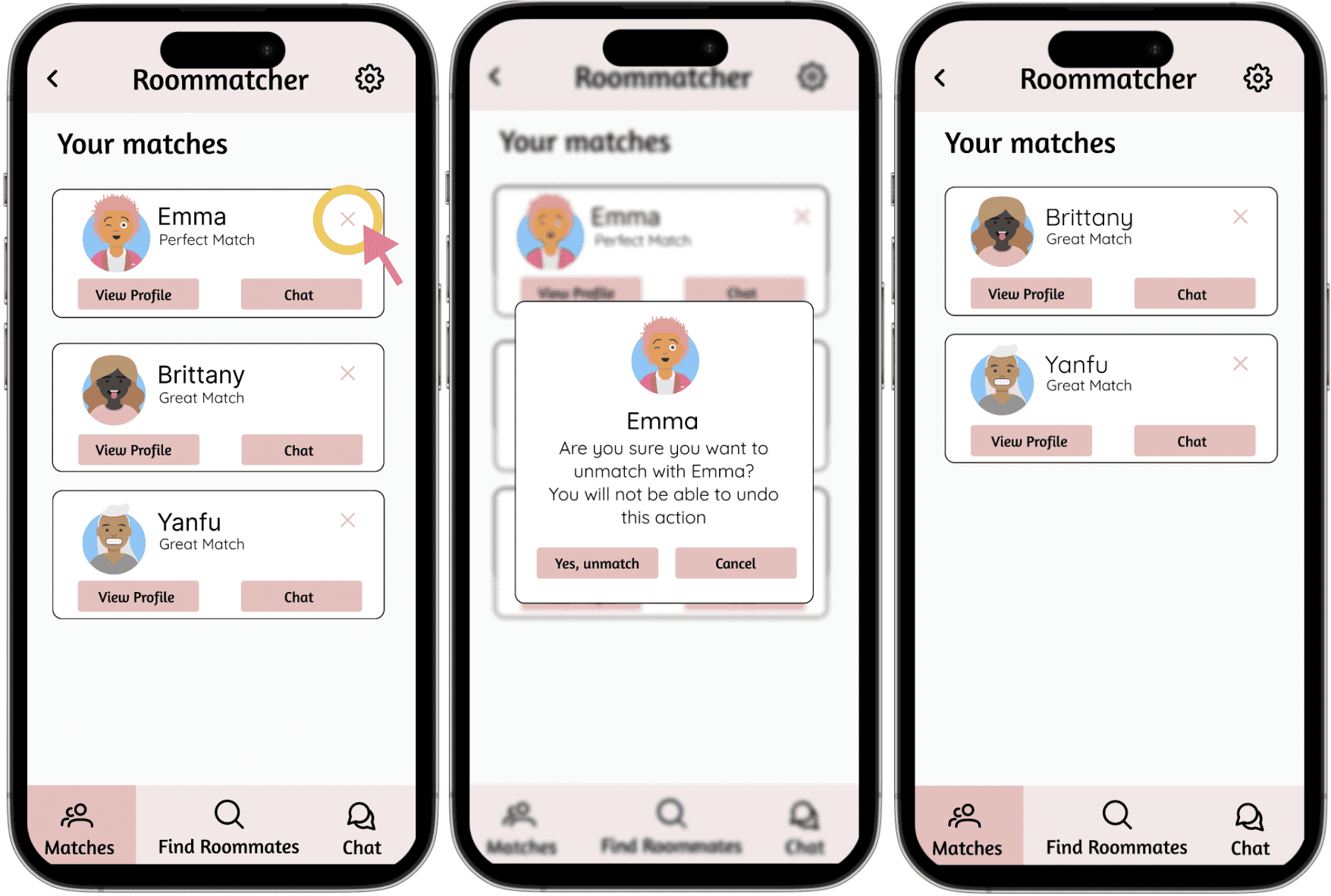
One potential solution could be adding a "remove" or "unmatch" button for every matched profiles. However, I felt like it could be redundant to have the remove button on every profile because it's unlikely that users would regularly use the button. So I suggested that we should add an "x" on the right top corner of each matched profiles, so that it's less distracting for the navigation and reduces the chances of mis-clicking the remove button.
In addition, I said that after a user clicked "x", there should be a pop up screen prompting users to confirm if they really want to remove a match, because there is a chance that the user mis-clicked the "x". Thus, Roommatcher has the following prompt when a user clicks on the "x": "Are you sure you want to unmatch with this user? You will not be able to undo this action".
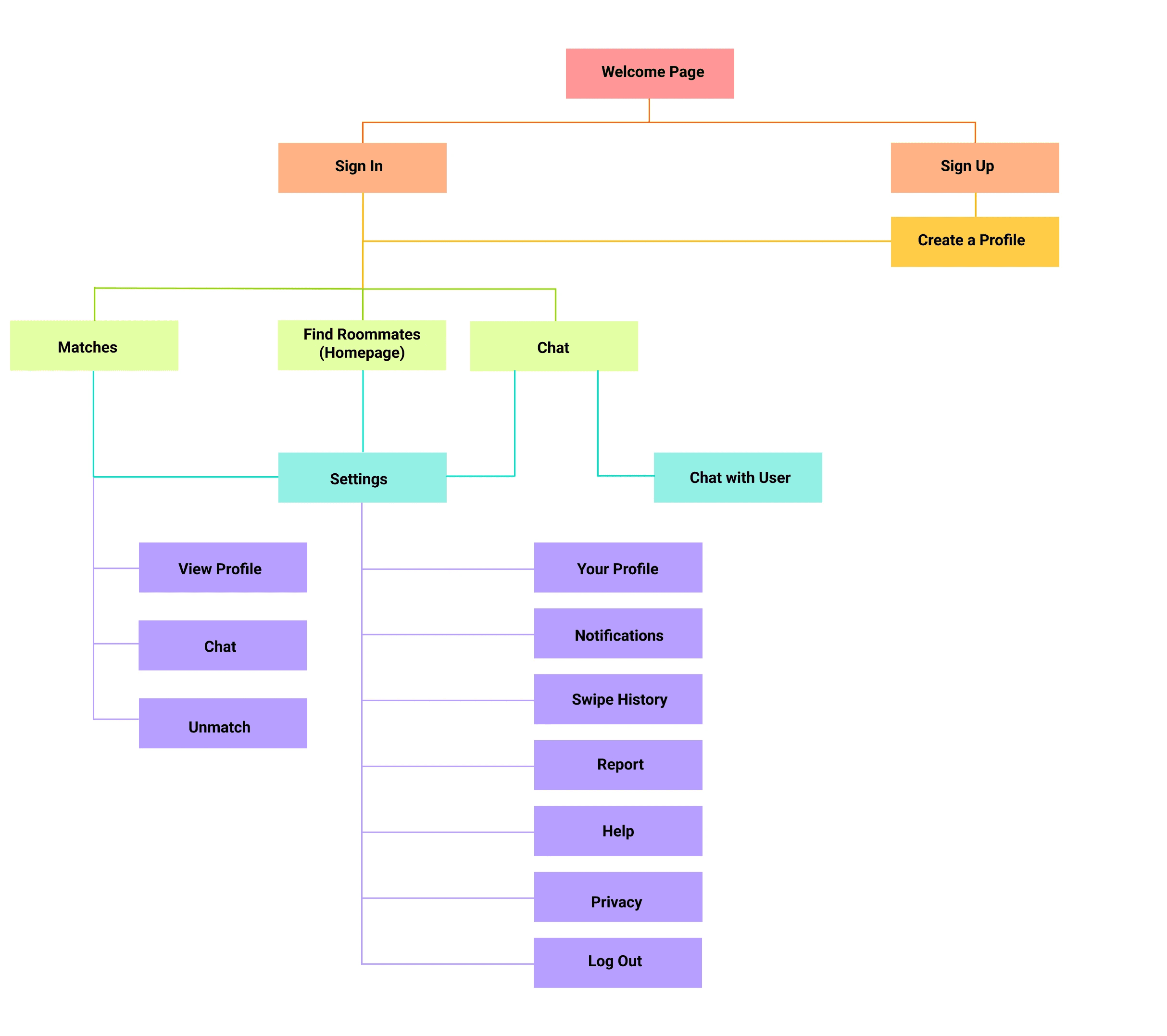
The information architecture for Roommatcher.
Highlights for the IA:
When a user choose to sign up for Roommatcher, the app prompts them to input their personal information and preference so that the user can receive precise recommendations
Roommatcher allows users to unmatch with current matches for any reason at any time.
The "Settings" button is always at the same corner on the screen because it's important for users to have quick access to relatively minor feature such as user profiles and swipe history.
User is able to see their swipe history just in case if they mistakenly swiped on someone's profile.
User is able to report any abuse to protect their own and the communities' safety.
developing A low-fidelity prototype
Low-Fidelity Prototype
After the team had a consensus on the information architecture, we started to build a low-fidelity prototype on Figma, focusing on the designing the key interactions and functions of the app.
During this stage of our design, the challenge for the team was that two of our team members were not familiar with using Figma, so I taught them some basics to help them get started.
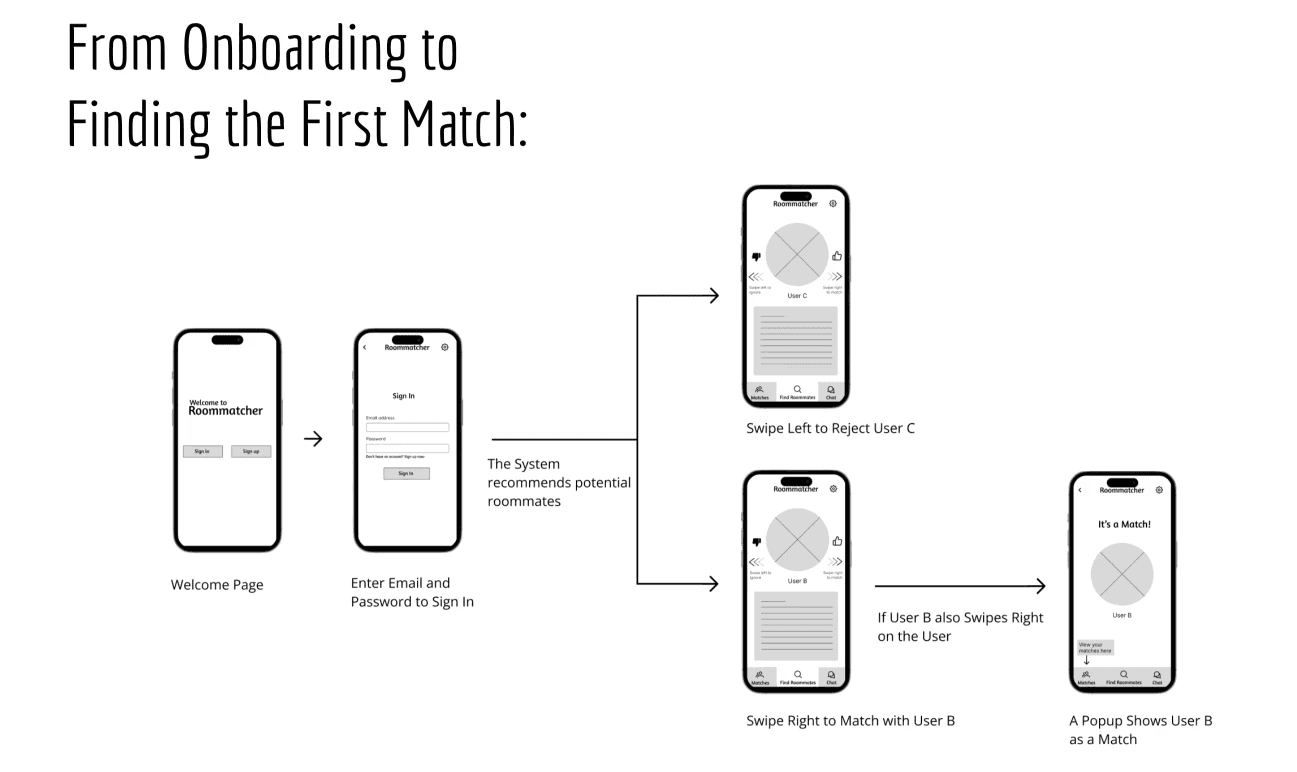
As a team, we built 30 screens for showcasing the users flows and main functionalities of Roommatcher. Specifically, there are 3 user flows that are most important to our app:
From Account Creation to Logging Out
From Onboarding to Finding the First Match
Chatting with a Match
Below is a visual interface state transition diagram that I made for the task "From Onboarding to Finding the First Match"
Visual interface transition diagram for the task "From Onboarding to Finding the First Match"
Annotated Wireframes
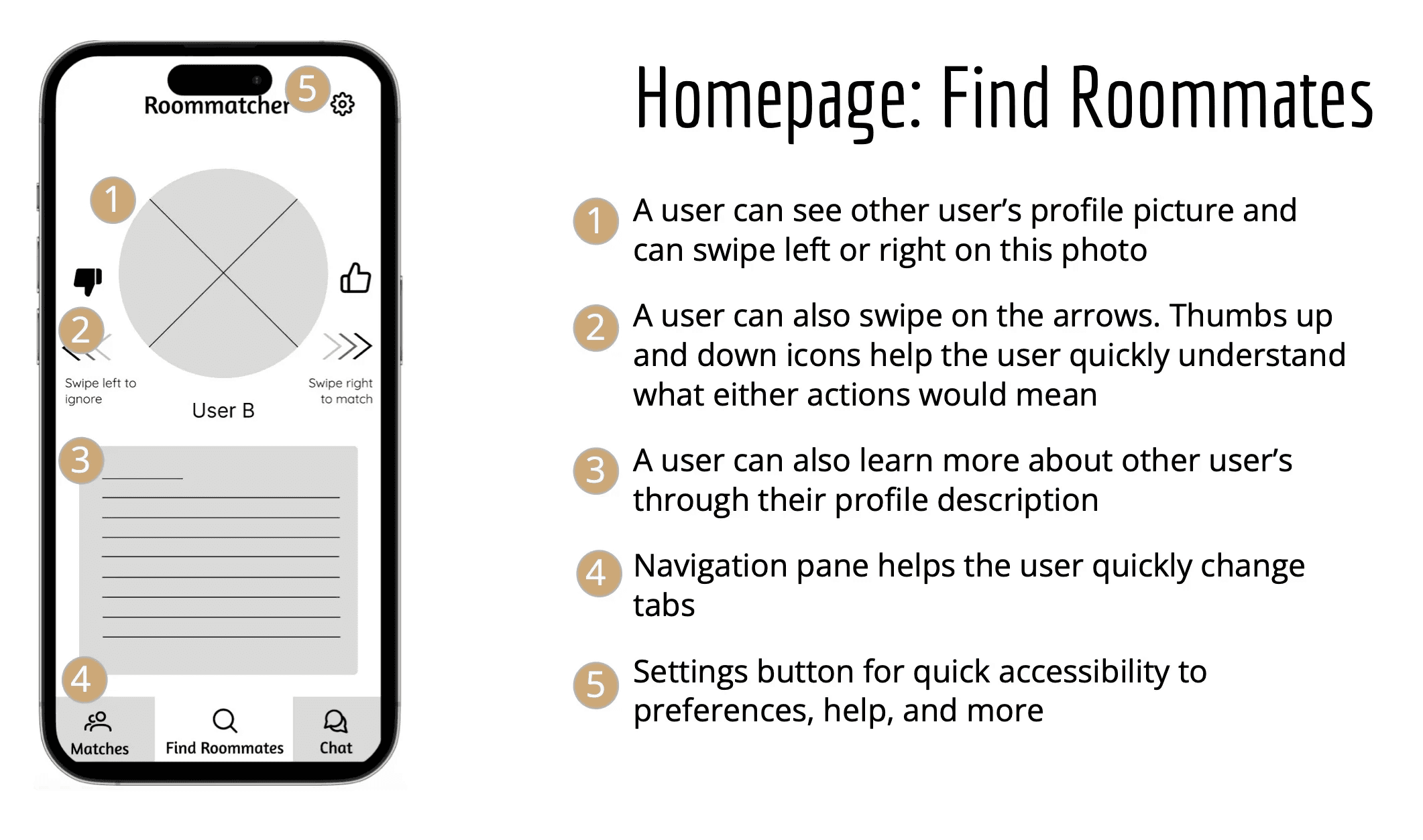
With the app's information architecture and design goals in mind, I created annotated wireframes for the key low-fidelity screens by specifying detailed interactions on each screen,
An example annotated wireframe for the "Find Roommates" screen.
The team created 20 such annotated wireframes in total.
Quick Usability testing
Usability Testing
Now that the team had our first iteration of the prototype, we wanted to conduct a quick usability testing to understand the user’s reactions as well as emotional journey when they interact with our app, and also to discover potential pitfalls in our app. With a collaboratively written protocol, each team members carried out on usability testing session with a potential user to get insight and feedback so that we can improve the prototype in our high-fidelity version.
I conduct a usability testing session with one participant, where I asked the participant to perform 3 tasks (described below) on Roommatcher lo-fi prototype and answer some post-testing interview questions.
Tasks for Evaluation
Task 1: From Account Creation to Logging out
Description: We asked the user to start with the welcome page and create a profile. After the homepage is shown, we asked them to log out by navigating the "Log out" button on the "Settings" page.
Task 2: From Signing in to Getting the First match
Description: We asked the user to start with the welcome page and sign in to their account. After the homepage is shown, we asked the user to interact with the roommate-finding swiping feature until they find their first match.
Task 3: From Signing in to Chatting with a Match (via the “Matches” page)
Description: We asked the user to start with the welcome page and sign in to their account. We then asked the user to navigate to the "Matches" tab to access a chat with one of their matches.
Findings from Usability Testing
The team gained a lot of insights from the usability testing sessions. First of all, users had different interpretations about the swiping feature. For example, participant IG tried to swipe on the “About me” menu while XW tried to swipe on the arrows. Second, some participants completely ignored the existence of the thumbs up and down buttons while some tried to interact with them by tapping on them. However, any interaction with the thumbs-up and -down buttons were made after participants tried to perform any sort of swiping action. Another problem that I identified from the testing session date for the lo-fi prototype was about the nontransparent matching algorithm:
I found that the users had trouble understanding the designated definition of becoming a match. One participant, XW, expressed their confusion on how to interpret the matching process, specifically, they were not able to identify if swiping right makes them a match or if mutually selected users are paired as a match. We envision the algorithm to recommend other users who have similar needs or interests based on their profile, and use machine learning to learn the user's swiping pattern and improve the recommendation quality. Once users are mutually selected, i.e., both of them swiped right on each other, the system will show the popup indicating that they are a match. Currently, users are not able to find this information anywhere on our prototype, and our challenge is to figure out a way to display how our algorithm decides if users are a match.
The solution that I offered to the team: We can add one more screen for app onboarding that provides instructions about how to use the roommate finding swiping feature as well as how the system decides if the users are a match. This screen is added to the user onboarding flow, making sure that users are aware of the matching algorithm before they get started with their roommate finding journey.
developing A high-fidelity prototype
Interface Design Sketches
With our lo-fi prototype and the findings we discovered from usability testing, we move on to developing a high-fidelity prototype.
One of the key decisions to make is the color palette of our app. The team decided to use warm colors such as light red or pink as our theme color because we wanted to create a welcoming and warm user experience when users are potentially anxious or stressed about finding roommates,
I created 5 interface design sketches to showcase the envisioned layout and key interactions in high-fidelity prototype.
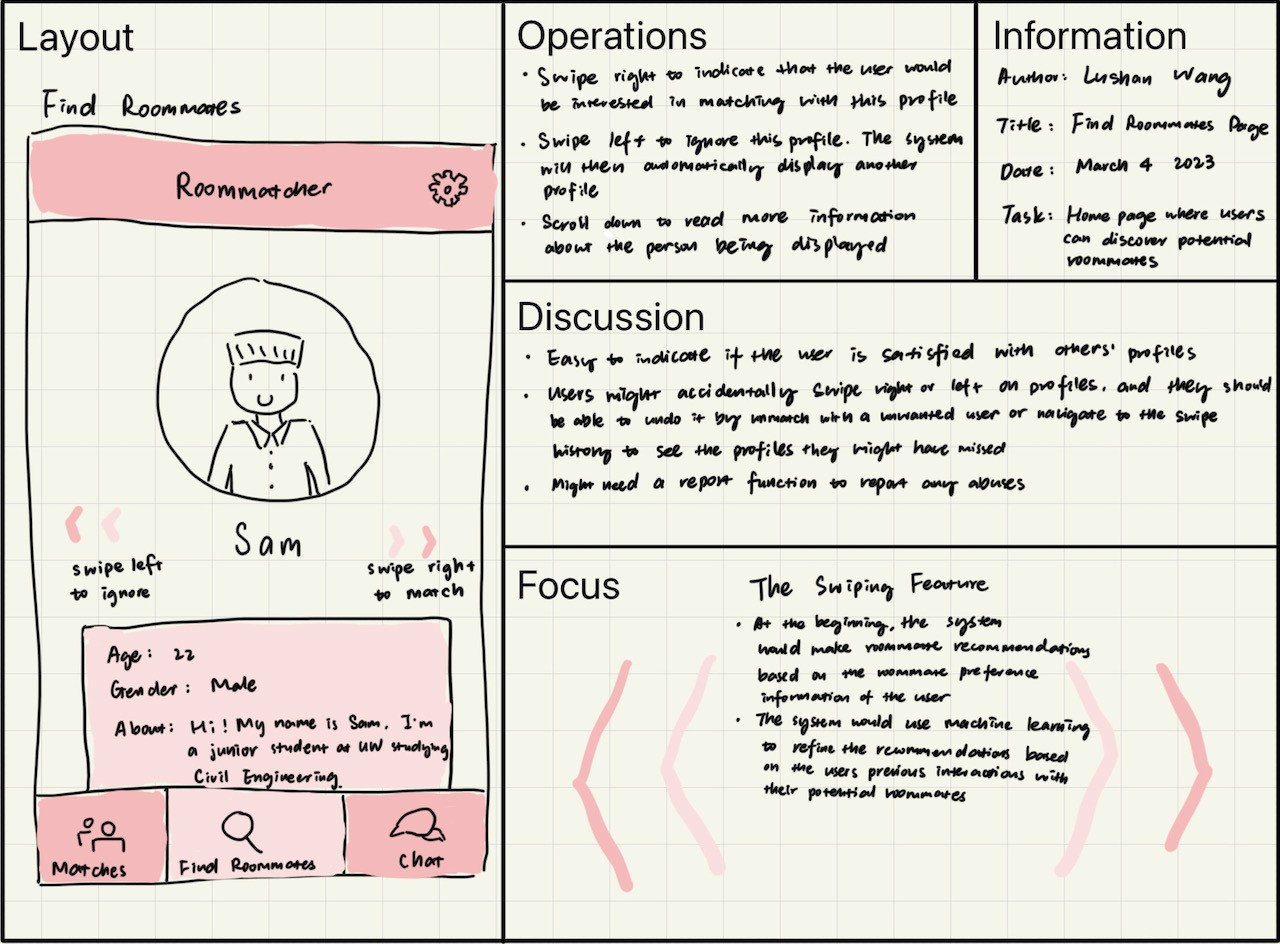
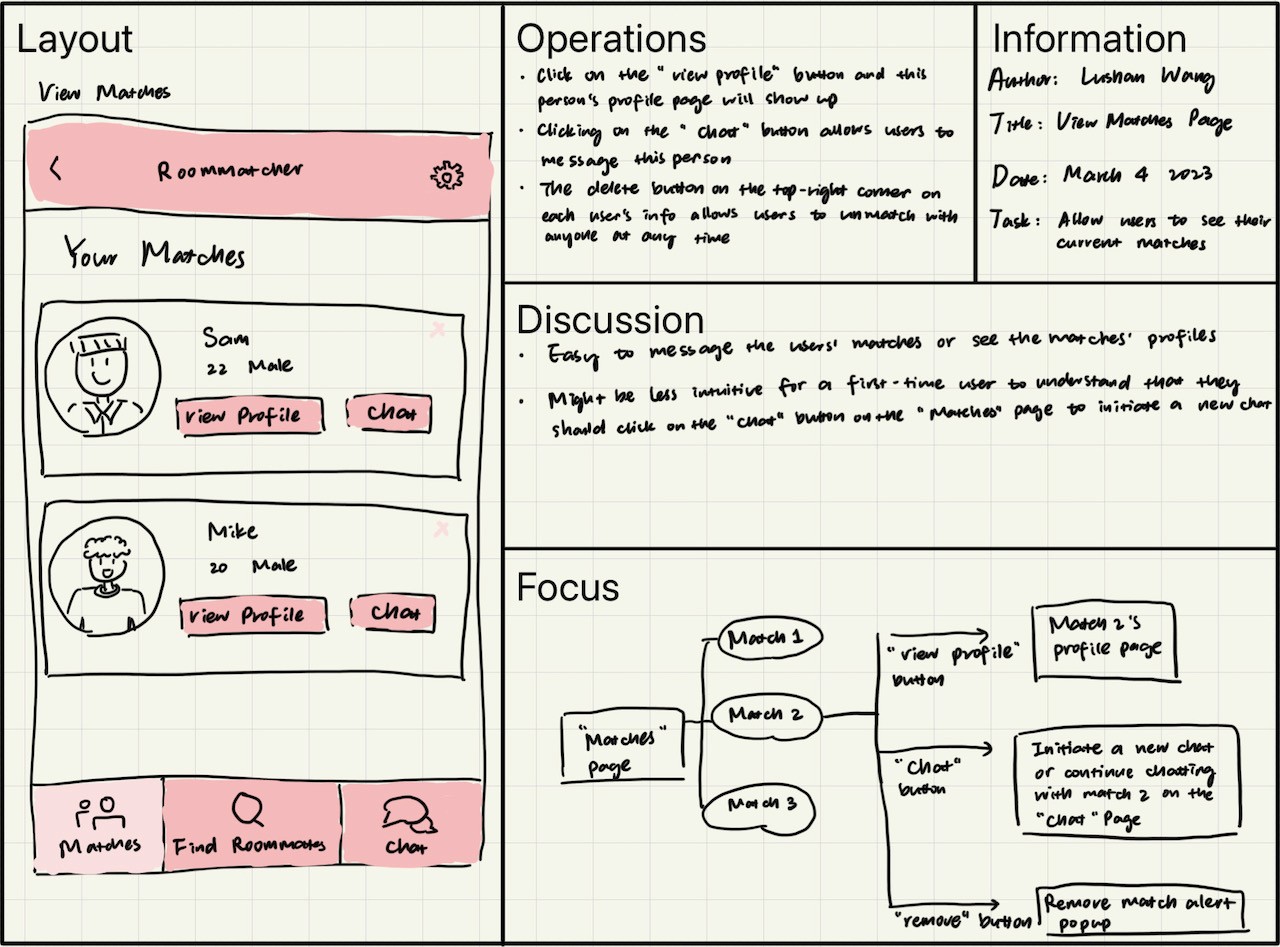
2 out of the 5 interface design sketches I drew, showcasing the layout and key interactions of the "Find Roommates" and the "Matches" pages.
Interactive High-Fidelity Prototype
By applying consistent color scheme and typography as well as fixing navigation pitfalls in the user flow, I built the high-fidelity prototype together with my teammates.
Below is the interactive Figma prototype for Roommatcher.
Interactive High-fidelity Prototype
for Roommatcher.
Click on "Sign In" or "Sign up"
to explore the app.
Key features
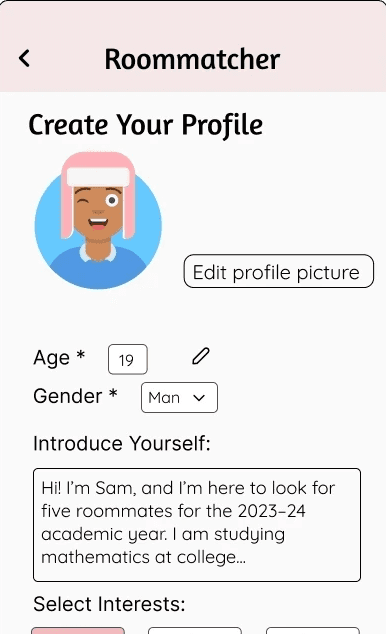
User Profile
Users are prompted to create a profile when they first create an account. During this onboarding process, Roommatcher asks the user to input their basic personal information, their personalities and habits, and their expectations and preferences for potential roommates.
The customizable user profile not only allows the algorithm to recommend compatible matches for the user, but also enables users to look at and learn more about their potential roommates.
The Swiping Feature
Swipe right to match.
Swipe left to ignore.
The swiping feature allows users to indicate if they are satisfied with the recommended roommate profiles or not.
We implemented the swiping feature because it not only allows users to read potential roommate's profiles one at a time, but also make the roommate-selection process intuitive and fun.
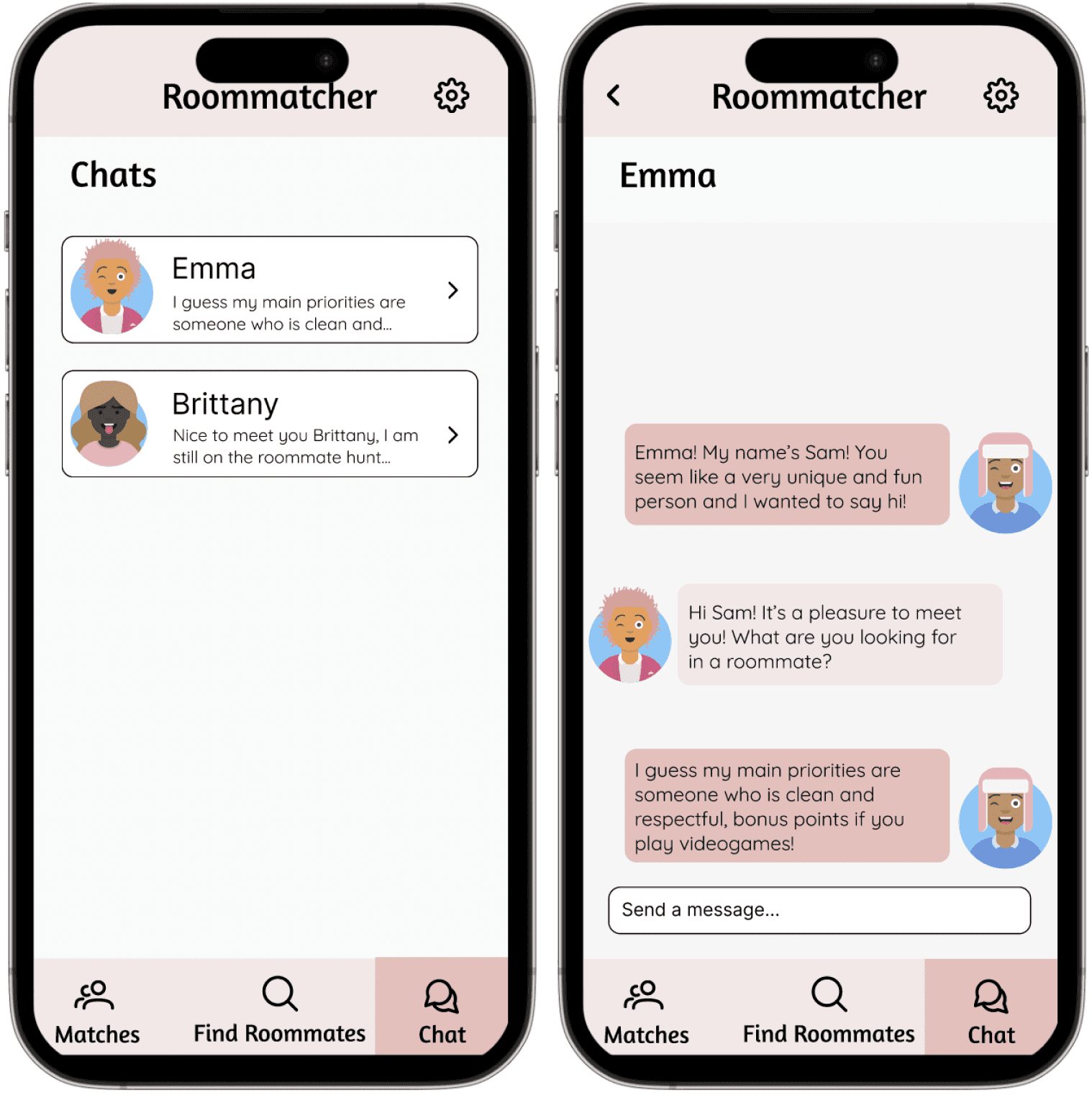
Chat
Wanted to know more about your match?
Use chat function.
Once the user is matched with a potential roommate, they can choose to interact with the match or not. If a user decides to message a match, they would go from the "chat" button on the matches page that opens up the "Chat" screen for a new conversation. Having a chat function is important because it enables users to connect and have a conversation with each other, so that they can have a better understanding of each other and decide if they wanted to be roommate with the person or not.
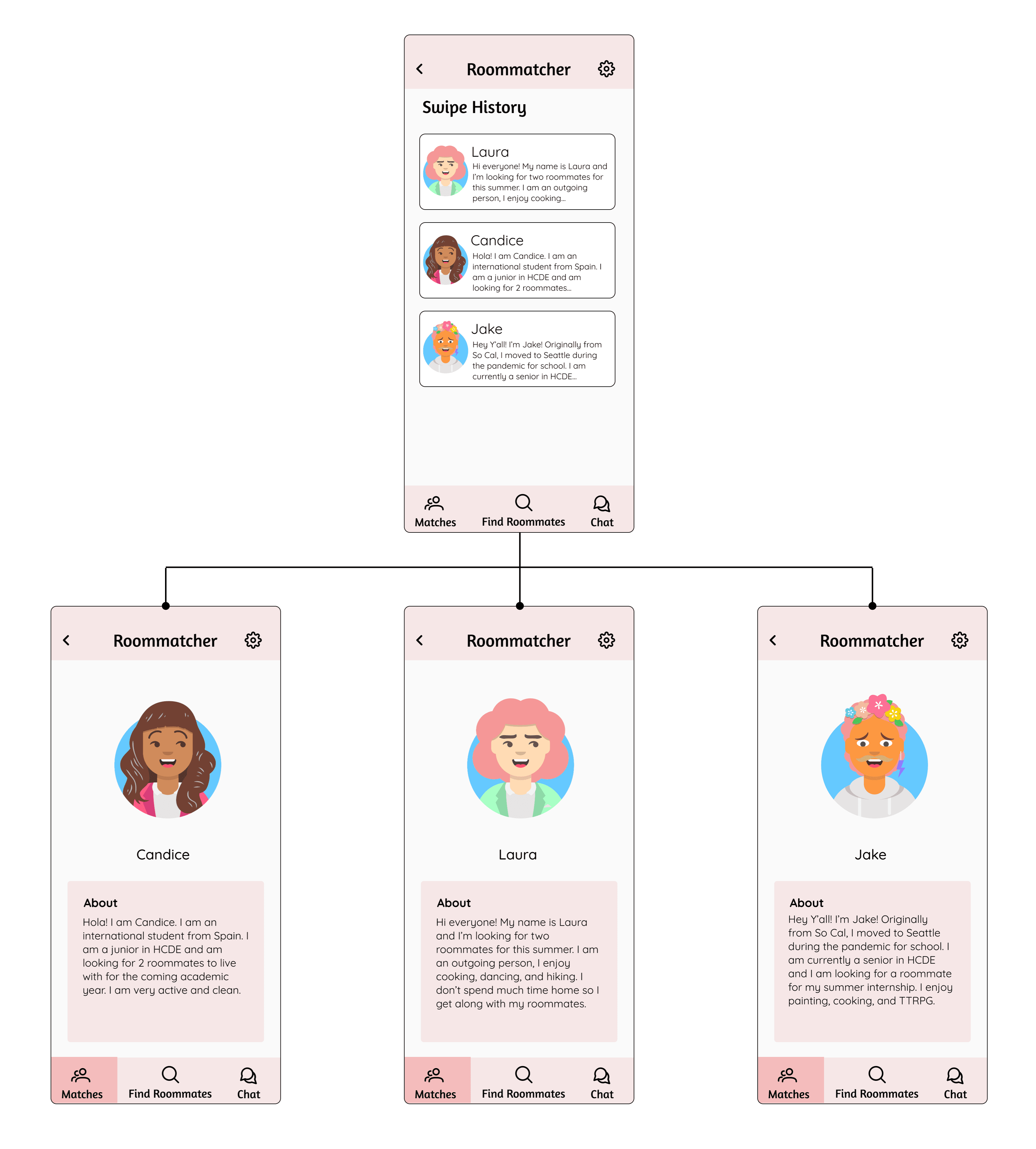
Swipe History
Mistakenly swiped to the left on a potential roommate?
The "Swipe History" feature in Roommatcher can help.
Roommatcher allow users to access their swipe history because they might be accidentally swiping left on a profile when they don't intend to. The swipe history is a quick and easy way for users to back search for any profiles they have seen.
Unmatch at Any Time
Not interested in matching with this person anymore?
Or if you already find a roommate?
No worries, you can always unmatch with anyone for any reason at anytime.
The "x" on the top-right corner of each of one of your matches is the "unmatch" button. Users can quickly unmatch with anyone by clicking the button and confirm if they wanted to unmatch. Once a user unmatch with someone, this action cannot be undo.
Reflection
Roommatcher is usable for solving the roommate-finding problem for UW students by recommend potential roommates to users. In terms of concern that I had for the impact of this app, I think there is a possibility that Roommatcher might be abused. This is because it's hard to keep track of either if users have input their information honestly or if users are respectful to each other. Also, Roommatcher needs users to input a lot of their personal information, which brings up privacy concerns. We would need to come up with logistics on user data usage to ensure that the information is properly used and protected.
Throughout this project, I practiced teamwork strategies such as setting team norms, responsive communication, and sharing my thoughts and expertise with teammates. There were several times that I had different opinions than others in my team, and I found it valuable to speak out our thoughts and articulate the rationales for making ethical and valid team decisions. Also, I supported two of my teammates, who were less familiar with Figma, by teaching them some basics and shortcuts of using the software.
The Roommatcher project enhanced my understanding of user-centered design and motivated me to further explore the area of design, design thinking, and human-computer interaction.
Next Steps
Refine Recommendation Logistics
We can further polish and specify how would the algorithm select and recommend profiles to users,
Improve the Non-major Features
There are a couple of non-major features that this project didn't focus on, including "Help:, "Privacy", and "Report". In our next iteration, we can incorporate the design details for these features.
Conduct User Research
We would like to conduct more user research to understand if there is pain points that we didn't hit on to potentially improve the usability of Roommatcher.
© 2025 Lushan Wang Portfolio. All rights reserved.